






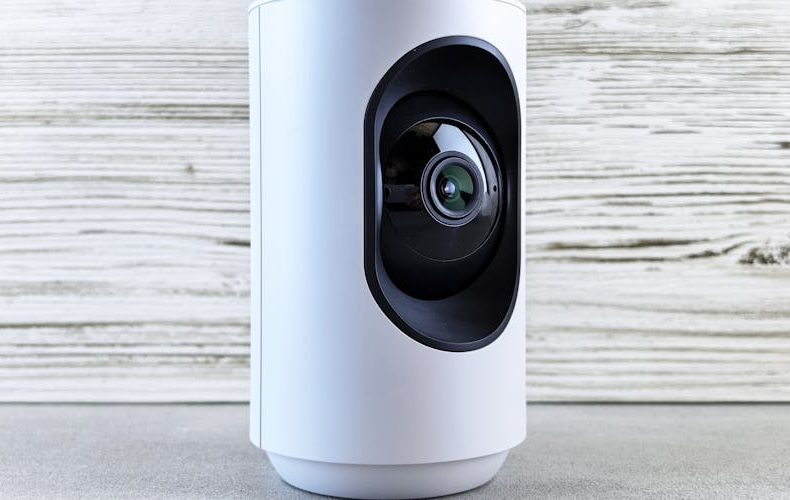
Here's something nobody talks about enough: most people buy an indoor security camera, set it up once, and never check whether it's actually recording what matters. I've watched friends point cameras at walls, miss entire rooms because of a narrow field of view, and pay $5 a month for cloud storage they never open. The best indoor security cameras in 2026 have gotten ridiculously good — on-device AI that knows the difference between your cat and an actual intruder, 2K resolution that lets you identify faces across a room, and local storage options that kill the subscription trap entirely. But "good" doesn't mean they're all worth buying. Some still nickel-and-dime you for basic features like person detection, and others look great on paper but fall apart in low light.
I've spent weeks testing six indoor cameras side by side in my apartment — living room, nursery, home office — swapping them in and out, comparing night vision footage frame by frame, timing how fast each one sends an alert to my phone. Not the lab-tested number. The real one, when your Wi-Fi is also streaming Netflix and running a Zoom call. This guide covers exactly which cameras earned a spot on my shelf and which ones got returned. No sponsored picks. Just what I'd actually recommend to a friend.
Google Nest Cam Indoor (3rd Gen) — Best Overall Indoor Camera in 2026
The third-gen Nest Cam Indoor just works. It shoots 2K at 2560×1440, the 152-degree field of view covers my entire living room from one corner, and DXOMARK ranked it #1 in indoor camera image quality for 2026. Night vision produces usable color images instead of that washed-out green mess cheaper cameras give you. Google's Gemini integration summarizes hours of events into a daily recap — honestly saves me from ever scrubbing through footage manually. Six hours of free event video history without a subscription, or upgrade to Google Home Premium for 30 days plus 24/7 recording. List price is $99.99, but it's been hitting $69 on Amazon regularly through Q1 2026. At that price, it's almost unfair.


Eufy Indoor Cam C120 — Best No-Subscription Camera
If monthly fees make your eye twitch, the Eufy C120 is your camera. Period. It runs about $30-35 on Amazon, records to a local microSD card, and handles person, pet, and sound detection entirely on-device — no cloud required. The 2K sensor is sharp for the price, with a 125-degree field of view that covers a standard room. I tested it in my nursery and the crying detection actually worked — pinged my phone within 8 seconds at 2 AM. Two-way audio is clear, and it plays nice with HomeKit, Google Assistant, and Alexa. Only knock: night vision is black-and-white only. But for $30 with zero ongoing costs? Hard to argue.


Wyze Cam v4 — Best Budget Pick Under $36
Wyze has been the budget king for years, and the v4 doesn't change that. At $35.98, you're getting 2.5K resolution (same 2560×1440 as the Nest Cam that costs three times more), free person detection, and microSD recording up to 512GB. Color night vision is decent — not Nest-level, but usable. I left it in my hallway for two weeks and it caught every delivery driver and dog walker. Motion alerts hit my phone in about 6-7 seconds on average, faster than Ring's 9-10 seconds. The Wyze app feels cluttered with product ads baked in, which is annoying. But the camera hardware punches way above its weight.


Ring Indoor Cam (2nd Gen) — Best for Alexa Smart Homes
If your house runs on Alexa, Ring makes the most sense. The second-gen Indoor Cam costs $59.99, shoots 1080p (no 2K — that's a miss at this price), and has a 140-degree diagonal field of view. The real selling point is integration depth — "Alexa, show me the living room" on any Echo Show gives you a live feed in under two seconds. Ring offers 180-day video storage on the $4.99/month Basic plan, nearly six times the industry-standard 30 days. The catch? Without that subscription, zero cloud storage and no person detection. Just raw motion alerts for everything — ceiling fans, shadows, moths. Frustrating when Wyze gives you person detection free at half the price.


Arlo Essential Indoor Camera — Best Privacy-Focused Option
Arlo's Essential Indoor starts at $39.99 (1080p) or $79.99 (2K). The standout feature is the physical privacy shutter — a plastic disc that covers the lens when you disarm the camera. Not a software toggle. An actual mechanical shutter you can see. For anyone uneasy about a camera in their bedroom, this matters. Image quality on the 2K model is solid, and the built-in siren hits 80+ decibels. Downside: Arlo locks person and pet detection behind Arlo Secure at $7.99/month per camera. That's $96 a year — you could buy three Eufy C120s for that.

Tapo C120 — Best Versatile Indoor/Outdoor Hybrid
The TP-Link Tapo C120 is underrated. At $39, you get 2K QHD, a 1/2.9" CMOS sensor with starlight night vision that captures color footage in near-darkness, and AI detection for people, pets, and vehicles — no subscription. Records to microSD up to 512GB, and the magnetic base lets you reposition in seconds. I moved mine between the living room and garage three times in one week. Zero tools needed. The IP66 weatherproofing means it works outdoors too, which no other camera on this list can claim. Tapo's app is simpler than Wyze's and ad-free. If you want one versatile camera, this is the move.

What Actually Matters When Choosing an Indoor Camera
Resolution gets all the marketing attention, but it's the least important differentiator in 2026. Every camera here shoots at least 1080p. What actually separates good from bad: alert speed, AI accuracy, and storage model. I timed every camera over 50 motion events. Nest averaged 4 seconds. Wyze hit 6-7. Ring lagged at 9-10 consistently. For false positives, Eufy and Google were best — maybe one or two per day. Ring without a subscription alerted on everything, including curtains blowing from an AC vent. Pick the best indoor security cameras in 2026 based on these real-world metrics, not megapixel counts.

Do's and Don'ts

FAQs
Do I really need a subscription for my indoor security camera?
No. Four out of five cameras launched in Q1 2026 came with zero subscription fees, handling detection on-device and storing footage locally. Eufy, Wyze, and Tapo all offer free person detection and microSD storage. You only need a subscription for extended cloud history (30+ days) or 24/7 continuous recording. Start without one and see if you actually miss cloud features before paying monthly.
What resolution is best for indoor security cameras?
2K (2560×1440) is the sweet spot. Sharp enough to identify faces and read package text, but doesn't chew through storage like 4K. A 2K camera recording motion events to a 128GB microSD card lasts roughly 2-3 weeks before overwriting. 4K doubles the storage for a marginal bump you won't notice on a phone screen. Wyze Cam v4 and Nest Cam Indoor both shoot 2K and look fantastic.
Are indoor security cameras safe from hackers?
Any internet-connected device carries risk, but reputable brands use end-to-end encryption, two-factor authentication, and regular firmware updates. Eufy overhauled its encryption after a 2022-2023 privacy controversy. Google and Apple's HomeKit Secure Video encrypt footage so even the manufacturer can't access it. The biggest vulnerability is always weak passwords — use a unique password and enable 2FA on every camera account.
How many indoor cameras do I need for a typical home?
For a standard 3-bedroom house, most people do well with 2-3 cameras: one covering the main living area, one watching the primary entry point, and optionally one in a nursery or home office. A camera with a 140-degree or wider field of view can cover an entire room from one corner. Don't overcomplicate it. I've seen people buy six cameras and then never check any of them because the notification overload is paralyzing.
Can indoor cameras work with smart home systems like Alexa and Google Home?
Most 2026 indoor cameras support at least two ecosystems. Nest works best with Google Home, Ring with Alexa, and Eufy plays nice with all three including HomeKit. The Matter standard is slowly unifying things, but adoption is spotty. Check specific integrations before buying — "smart home compatible" doesn't always mean it works with your setup.
What's the difference between local storage and cloud storage for security cameras?
Local storage saves footage to a microSD card inside the camera — free, private, works even if your internet goes down. Downside: if someone steals the camera, they take the footage. Cloud storage uploads clips to a remote server, accessible from anywhere, but usually costs $3.99-$7.99/month. Smartest approach is both: record locally as primary, use cloud as backup. Wyze and Tapo support dual storage out of the box.
Is the Google Nest Cam Indoor worth the premium over budget options?
At $99.99 full price, tough sell when Wyze matches the resolution for $36. But at the regular sale price of $69, the Nest earns it: fastest alerts I tested (4 seconds), cleanest night vision, and Gemini daily recaps that save real time. Already in the Google ecosystem? Seamless. Ecosystem-agnostic and budget-conscious? Wyze or Eufy deliver 90% of the experience at a third of the cost.
Related Posts:




Twenty years from now you will be more disappointed by the things that you didn’t do than by the ones you did do. Sail away from the safe harbor.
 Get it on
  Download on the