Roku Streaming Stick 4K vs Fire TV Stick 4K Max vs Apple TV 4K: Best Streaming Device for Every Budget
Picking a streaming device should be simple, plug it in, open Netflix, watch your show. But somehow the market has turned it into a confusing mess of spec sheets, ecosystem lock in, and subscription upsells that make buying a $40 stick feel like choosing a mortgage. I’ve spent the last month comparing the three devices that keep dominating every “best streaming stick” conversation in 2026: the Roku Streaming Stick 4K at $49.99, the Amazon Fire TV Stick 4K Max (2nd Gen) at $59.99, and the Apple TV 4K starting at $129. They all stream 4K with HDR. They all have voice remotes. They all claim to be the best. But they’re built for completely different people with completely different priorities, and the “right” answer depends on whether you care more about saving money, getting the fastest hardware, or staying locked into an ecosystem you already use. After comparing real world performance, app selection, picture quality, and the stuff that actually matters day to day, like how annoying the ads are on the home screen, I have strong opinions about each one.
Here’s what makes this comparison tricky: these three devices aren’t really competing at the same price tier. The Roku costs roughly $50, the Fire Stick Max sits at $60, and the Apple TV 4K starts at $129 for the Wi Fi model and jumps to $149 for Wi Fi + Ethernet with 128GB storage. Comparing them purely on specs would be unfair to Roku and Amazon, and comparing them purely on price would be unfair to Apple. So instead of crowning one “winner,” I’m going to tell you exactly which device makes sense for your specific situation, your budget, your phone ecosystem, your tolerance for ads, and how much you actually care about things like Dolby Atmos and Wi Fi 6E. I’ll cover real processor benchmarks, actual picture quality differences you can see with your eyes, and the hidden annoyances that spec sheets never mention. Because the worst streaming device is the one that frustrates you every time you turn on your TV, regardless of what it cost.
Roku Streaming Stick 4K: The No Nonsense Budget Pick at $49.99
The Roku Streaming Stick 4K is the device I recommend to anyone who just wants to stream without dealing with a cluttered, ad heavy interface. At $49.99, it runs on a quad core ARM Cortex A55 processor with 1GB of RAM and 4GB of internal storage. Those specs sound modest compared to the competition, but Roku’s lightweight OS barely needs more, apps load in 2-3 seconds, scrolling through menus feels snappy, and I’ve never experienced a crash or freeze during testing. The stick supports 4K UHD at 60fps with Dolby Vision, HDR10, HDR10+, and HLG, which means it handles every major HDR format regardless of which TV you own. It connects over dual band Wi Fi 5 (802.11ac) with Roku’s redesigned long range wireless receiver that claims speeds up to 2x faster than the previous generation. In my testing, streaming 4K Dolby Vision content on Disney+ and Netflix was buffer free from 30 feet away through two walls. Audio support includes Dolby Atmos via passthrough to compatible soundbars and receivers.
Where Roku genuinely shines is the software experience. The home screen shows your apps in a clean grid, no giant banner ads for shows you don’t care about, no auto playing trailers that eat your bandwidth, and no hard push toward any single streaming service. Roku treats Netflix, Hulu, Disney+, Apple TV+, and Amazon Prime Video equally. The universal search pulls results from 50+ services and sorts by price, so you’ll see where a movie is free before it suggests you buy it for $14.99. The Roku Channel gives you a surprising amount of free ad supported content too. The remote includes dedicated shortcut buttons (Netflix, Disney+, Apple TV+, and Roku Channel on the current model) and a voice button that uses Roku’s own voice assistant. The biggest drawback is the 1GB RAM limitation, if you’re a power user who rapidly switches between heavy apps like YouTube 4K and gaming apps, you’ll notice occasional app reloads. But for 95% of people who open one or two apps per session, it’s perfectly adequate.
Fire TV Stick 4K Max (2nd Gen): The Power User’s Pick at $59.99
Amazon’s Fire TV Stick 4K Max 2nd Gen is the most powerful streaming stick you can buy under $60, and the spec sheet backs that up. It runs a 2.0GHz quad core MediaTek MT8696T processor with an 850MHz GPU, 2GB of RAM, and 16GB of storage, double the RAM and quadruple the storage compared to the Roku. The headline feature is Wi Fi 6E support with tri band connectivity across 2.4GHz, 5GHz, and 6GHz bands, making it the only stick in this comparison that can take advantage of the less congested 6GHz spectrum. If you have a Wi Fi 6E router and live in an apartment building where 5GHz channels are packed, this genuinely makes a difference in streaming consistency. Video output maxes at 4K 60fps with Dolby Vision, HDR10, HDR10+, and HLG. Audio supports Dolby Atmos and Dolby Digital Plus. The ambient experience feature turns your TV into a rotating art display or smart home dashboard when you’re not streaming, which is a nice touch if your TV is in a prominent living room spot.
The Fire TV interface is where opinions split hard. Amazon redesigned the Fire TV experience with a new UI rolling out through 2026, and it looks cleaner than the old version, but ads are still baked into the experience. The home screen prominently features sponsored content, recommended shows from Amazon’s own services, and banner ads that you cannot disable without third party workarounds. If you’re an Amazon Prime member, this integration works in your favor, Alexa voice search is genuinely excellent, hands free Alexa commands let you control smart home devices, and Prime Video content gets first class treatment throughout the interface. The 16GB storage means you can download shows for offline viewing and install dozens of apps without running into space limits. Fire TV also supports Luna cloud gaming and has a dedicated gaming mode. The Alexa remote with dedicated app buttons rounds out the package. The biggest downside, honestly, is Amazon’s aggressive promotion of its own ecosystem. If you don’t use Prime Video, Alexa, or Ring cameras, about 30% of the interface real estate feels like advertising you never asked for.
Apple TV 4K: The Premium Powerhouse Starting at $129
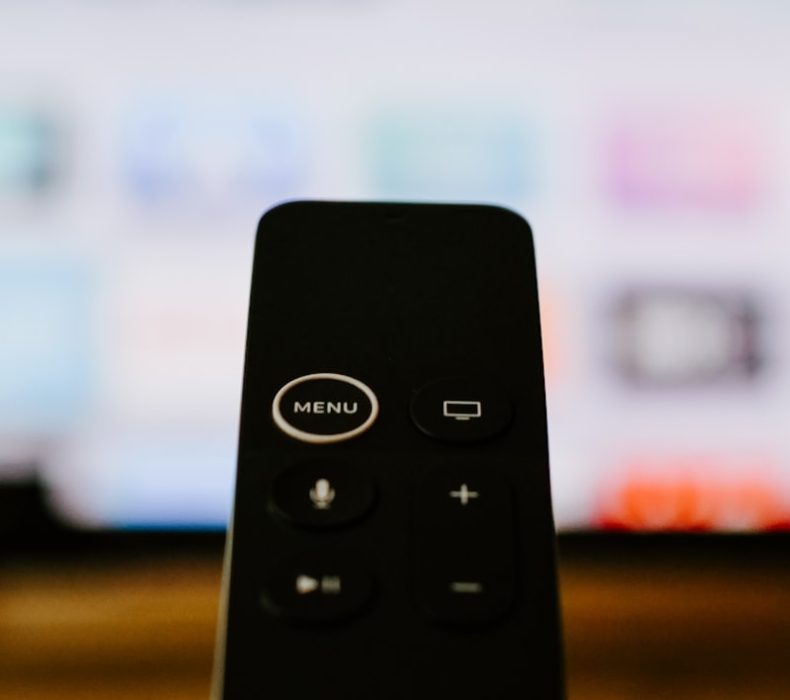
The Apple TV 4K runs on Apple’s A15 Bionic chip, the same processor that powered the iPhone 13 Pro, and it shows in every interaction. Apps open instantly. Menus animate at a buttery 60fps without a single dropped frame. Scrolling through long content libraries feels like using an iPad rather than a streaming stick. You get 64GB of storage on the $129 Wi Fi model or 128GB on the $149 Wi Fi + Ethernet model, plus Thread smart home support on the higher end version. Video output supports 4K HDR at 60fps with Dolby Vision, HDR10, HDR10+, and HLG. Dolby Atmos audio support is full, and the Apple TV handles spatial audio with head tracking when paired with AirPods Pro or AirPods Max. The Siri Remote has a touch enabled clickpad, a dedicated Siri button, and a USB C charging port. Build quality feels like an actual Apple product, aluminum remote, solid little box, and a genuine premium unboxing experience that the sticks can’t match.
Where Apple TV justifies its price premium is the software polish and ecosystem integration. tvOS is the cleanest, most ad free streaming interface available. No banner ads, no sponsored rows, no auto playing trailers unless you specifically navigate to them. The Apple TV app aggregates content across services with a “Watch Now” tab that learns your preferences over time. AirPlay support means you can mirror your iPhone, iPad, or Mac to your TV instantly with zero setup. SharePlay lets you watch movies or listen to music in sync with friends on FaceTime. Apple Fitness+ workouts look incredible on a big screen. If your household has iPhones, Macs, and AirPods, the Apple TV 4K ties them together seamlessly in ways that Roku and Amazon simply cannot replicate. The catch is obvious: $129 is more than double the Fire Stick Max and nearly triple the Roku. If you’re not in the Apple ecosystem, you’re paying a significant premium for polish that may not matter to you. And Apple TV+ content gets subtle prioritization in search results, though it’s nowhere near as aggressive as Amazon’s approach.
Picture and Audio Quality: Can You Actually See the Difference?
All three devices support 4K, Dolby Vision, HDR10+, Dolby Atmos, and HLG, so on paper, they should look and sound identical. In practice, there are subtle differences that depend on your TV and content. The Apple TV 4K handles frame rate matching and color calibration better than either competitor. Its “color balance” feature uses your iPhone’s front camera to calibrate output to your specific TV panel, which is a genuinely useful trick that noticeably improves shadow detail and color accuracy on mid range TVs. The Fire TV Stick 4K Max tends to produce slightly punchier, more saturated colors out of the box, which looks great on Samsung and Hisense TVs but can appear over processed on already accurate LG OLED panels. The Roku Streaming Stick 4K outputs a neutral, reference level image that looks correct but doesn’t do any processing magic on top.
For audio, the Apple TV 4K wins by a clear margin if you own AirPods. Spatial audio with dynamic head tracking turns a regular movie night into something genuinely immersive. All three pass through Dolby Atmos to compatible receivers and soundbars without issues. The Fire Stick Max supports Dolby Digital Plus natively and passes Atmos via eARC, which works identically to the Apple TV for wired audio setups. The Roku handles Atmos passthrough as well, though a small number of users have reported occasional audio sync issues with specific soundbar models when playing Atmos content from Disney+, a firmware level quirk that may or may not affect your setup. Bottom line: if you’re watching on a $400 TCL with built in speakers, all three devices look and sound functionally identical. The differences only matter once your display and audio equipment costs more than the streaming device itself.
The Ad Problem: How Much Marketing Will You Tolerate?
This is the factor that spec sheets never mention, and it might be the most important consideration for daily satisfaction. The Fire TV Stick 4K Max has the most aggressive advertising of the three. The home screen features a large sponsored banner at the top, a “Sponsored” row of recommended content, and occasional full screen ads when waking the device from sleep. You cannot disable these without sideloading third party launchers, which Amazon’s updates periodically break. If you’re paying $8.99/month for ad free Hulu and $15.99/month for Netflix Premium specifically to avoid ads, the irony of your streaming device itself showing you ads every time you turn on the TV is hard to ignore. The Roku home screen is significantly cleaner, there’s a small ad panel on the right side of the screen, but it doesn’t take over the interface or auto play anything. It’s noticeable but not intrusive. The Apple TV 4K has zero third party advertising on the home screen. The only promotional content comes from the Apple TV app itself, which surfaces Apple TV+ shows alongside content from your other subscriptions. For the ad averse, Apple wins this category by a landslide, with Roku as a reasonable middle ground.
Do’s and Don’ts: Choosing the Right Streaming Device in 2026
Do’s
Don’ts
Do buy the Roku Streaming Stick 4K if you want the best value with a clean, neutral interface
Don’t pick the Roku if you need Wi Fi 6E or plan to use your stick for cloud gaming
Do choose the Fire TV Stick 4K Max if you’re an Alexa and Prime ecosystem household
Don’t buy the Fire Stick Max expecting an ad free experience, sponsored content is baked into Fire TV
Do get the Apple TV 4K if you own iPhones, AirPods, and want the most polished software experience
Don’t spend $129 on an Apple TV if you use Android phones and have no Apple devices at home
Do check whether your Wi Fi router supports 6E before paying extra for the Fire Stick Max
Don’t assume Wi Fi 6E alone will fix buffering, your internet speed matters more than your router protocol
Do consider how many people in your household will use the device before picking a platform
Don’t ignore the remote, you’ll hold it every single day, and ergonomics matter more than you think
Do use Roku’s universal search to find the cheapest place to watch a movie across all your apps
Don’t pay full price for any of these, all three regularly go on sale during Prime Day and Black Friday
Do enable frame rate matching on all three devices for judder free movie playback
Don’t skip setting up HDR properly, wrong settings can make 4K content look washed out
Do buy an Ethernet adapter for your Apple TV 4K if you stream 4K Atmos content on a wired home theater
Don’t expect the Roku’s 1GB RAM to handle heavy multitasking between gaming and streaming apps
Do take advantage of Apple TV’s color calibration feature using your iPhone to optimize picture quality
Don’t choose a streaming device based on one exclusive app, most major services are on all three platforms
Do check if your TV has built in Roku or Fire TV before buying a separate stick
Don’t buy the cheapest device just to save $10 if the missing features will frustrate you for years
My Verdict: Which Streaming Device Should You Actually Buy?
Three devices, three clear buyer profiles, here’s exactly where each one makes sense. If you want a reliable 4K streaming device that stays out of your way and doesn’t bombard you with ads, the Roku Streaming Stick 4K at $49.99 is the smartest purchase for most people. It supports every HDR format, has a clean interface that treats all streaming services equally, and just works without any ecosystem lock in. The 1GB of RAM and Wi Fi 5 are technically behind the competition, but for the core job of streaming Netflix, Hulu, Disney+, and YouTube in 4K, you’ll never notice the difference. This is the one I recommend to parents, non tech savvy family members, and anyone who just wants to watch TV without thinking about it.
If you’re already deep in the Amazon ecosystem, Prime Video, Alexa smart speakers, Ring doorbell, the whole stack, the Fire TV Stick 4K Max at $59.99 is the natural choice. The 2GHz processor and 2GB of RAM make it noticeably snappier than the Roku for power users, Wi Fi 6E future proofs your wireless connection, and 16GB of storage gives you room to download content and install tons of apps. The Alexa integration for controlling smart home devices from your TV is genuinely useful, not just a gimmick. You just have to accept the ads as the cost of Amazon’s hardware subsidization. If you’re an Apple household with iPhones, AirPods, and a MacBook, the Apple TV 4K at $129 is worth every penny. The A15 Bionic chip makes it the fastest streaming device by a wide margin, AirPlay and spatial audio create experiences the other two literally cannot offer, and the zero ad tvOS interface is a breath of fresh air. It’s expensive for a streaming box, but it’s the only one that genuinely feels like a premium product. My overall pick for most buyers in 2026? The Roku Streaming Stick 4K. It nails the fundamentals at half the price and doesn’t try to sell you anything after you’ve already bought it.
Frequently Asked Questions
Is the Roku Streaming Stick 4K good enough for Dolby Vision and Dolby Atmos content?
Yes, the Roku Streaming Stick 4K fully supports Dolby Vision, HDR10, HDR10+, HLG, and Dolby Atmos passthrough. When you fire up a Dolby Vision title on Netflix or Disney+, the picture quality is indistinguishable from what you’d get on the Apple TV 4K or Fire Stick Max on the same TV. The Roku doesn’t do any extra image processing or color calibration like the Apple TV does, so you’re getting a clean signal passed directly to your display. For Dolby Atmos, make sure your soundbar or receiver supports eARC and that you’ve enabled the passthrough setting in Roku’s audio menu. The only real world difference is that the Apple TV can calibrate colors to your specific panel, which can improve shadow detail on cheaper TVs, but on any decent 4K TV from the last few years, the Roku’s output looks fantastic.
Does the Fire TV Stick 4K Max really need a Wi Fi 6E router to work well?
No, the Fire Stick 4K Max works perfectly fine on older Wi Fi 5 and Wi Fi 6 routers. The Wi Fi 6E capability is a bonus for people who already have a compatible router, it lets the stick connect on the less congested 6GHz band, which can reduce buffering in apartment buildings where dozens of neighbors are competing for the same 5GHz channels. If your current router is Wi Fi 5 (802.11ac) and you’re streaming 4K without issues, you won’t gain anything meaningful by buying a new router just for this stick. The real performance advantage of the Fire Stick Max over the Roku comes from its faster 2GHz processor and 2GB of RAM, which makes the interface feel snappier and handles app switching better, that benefit exists regardless of your router.
Can I use Apple TV 4K without any other Apple devices?
Technically yes, but you’d be paying $129 for features you can’t fully use. The Apple TV 4K works with any TV and any smartphone, you can control it with the included Siri Remote and access all major streaming apps (Netflix, Hulu, Disney+, YouTube, Amazon Prime Video, etc.) without an iPhone. However, you lose AirPlay screen mirroring, spatial audio with AirPods, the color calibration feature (requires an iPhone with Face ID), SharePlay watch parties, and seamless iCloud photo sharing on the big screen. These are arguably the features that justify the price premium over a $50 Roku. If you’re an Android user, you’re essentially paying $80 extra for a faster processor and a cleaner interface, which some people value, but it’s a harder sell at that point.
Which streaming device has the best app selection in 2026?
All three platforms carry every major streaming app, Netflix, Hulu, Disney+, HBO Max, Amazon Prime Video, Apple TV+, Peacock, Paramount+, YouTube, YouTube TV, Spotify, and Tubi are available on Roku, Fire TV, and Apple TV. The differences are in the niche apps. Roku has the largest overall app library with its Channel Store offering thousands of free and paid channels, including many obscure niche services. Fire TV has strong gaming integration with Luna cloud gaming and a growing selection of Android based games. Apple TV has the smallest app count but tends to have higher quality, curated apps, Apple Fitness+, Apple Arcade games, and premium apps like Infuse for local media playback are excellent. For 99% of viewers who use 5-8 streaming services, all three platforms have you covered. The app selection is only a differentiator if you need a very specific niche channel.
How often do these streaming devices go on sale, and what’s the best price to wait for?
All three devices hit their lowest prices during Amazon Prime Day (usually July), Black Friday, and holiday sales in December. The Roku Streaming Stick 4K regularly drops to $29.99 during major sales, a $20 discount from its $49.99 retail price. The Fire TV Stick 4K Max frequently hits $34.99 during Prime Day and Black Friday, down from $59.99, making it the biggest percentage discount of the three. The Apple TV 4K rarely sees deep discounts from Apple directly, but Amazon and Best Buy typically knock $20-30 off during holiday sales, bringing the 64GB Wi Fi model to around $99-109. If you’re not in a rush, waiting for a sale is almost always worth it, especially for the Fire Stick, where the Black Friday price makes it cost nearly the same as a regular price Roku.
Do any of these streaming devices support local media playback from a USB drive or NAS?
The Apple TV 4K handles local media playback the best thanks to apps like Infuse and VLC, which can stream from a NAS, Plex server, or shared network folder in virtually any format, MKV, HEVC, DTS, TrueHD, you name it. The A15 chip has enough horsepower to direct play 4K HDR remux files without transcoding, which Plex users will appreciate. The Fire TV Stick 4K Max supports Plex, VLC, and Kodi, giving you good local playback options, though the 2GB RAM means very large files occasionally stutter. It also supports USB OTG with an adapter for playing from external drives. The Roku Streaming Stick 4K supports Plex and the Roku Media Player app for DLNA streaming, but its 1GB RAM and more limited codec support make it the weakest option for local media. If you have a large personal media library, the Apple TV 4K is the clear winner here.
Will these streaming devices make my older 1080p TV look better?
The Roku Streaming Stick 4K includes upscaling that converts 720p and 1080p content to near 4K quality, but this only matters if you’re outputting to a 4K TV. If your TV is 1080p, all three devices will output at 1080p and you won’t get any 4K or HDR benefits, those features require a 4K HDR capable display. That said, even on a 1080p TV, you’ll still benefit from the faster processors, better app experiences, voice search, and overall snappier performance compared to whatever built in smart TV system your older TV has. The streaming apps themselves will look identical across all three devices on a 1080p set. If you’re on a 1080p TV and budget is the priority, save your money and grab the base Roku Streaming Stick (non 4K) for $29.99, paying extra for 4K capabilities you can’t use doesn’t make sense.
Which streaming device is best for a household with kids?
The Apple TV 4K offers the most robust parental controls, you can restrict content by rating, require a PIN for purchases, disable specific apps, and set up separate user profiles. The Fire TV Stick 4K Max has Amazon Kids+, a dedicated kids profile with curated, age appropriate content from Disney, Nickelodeon, and PBS, it’s a subscription service ($4.99/month or free with Prime), but the interface is genuinely kid friendly and the parental controls are solid. Roku’s parental controls are more basic, you can set a PIN for purchases and restrict content by rating, but there’s no dedicated kids mode. For families with young children, the Fire TV’s Amazon Kids+ is probably the most practical solution if you want a self contained, kid safe environment. For older kids and teenagers where you mainly want purchase restrictions and rating filters, all three get the job done.
We use cookies to see which reviews and buying guides readers find useful, so we can keep improving them. Accept analytics cookies, or carry on with essential ones only. See our Cookie Policy.















 Get it on
  Download on the