Every couple of years, the networking industry rolls out a new Wi Fi standard and acts like your entire home network is suddenly obsolete. Wi Fi 7, technically IEEE 802.11be, landed with promises of 46Gbps theoretical speeds and near zero latency, which sounds incredible until you realize your internet plan probably tops out at 500Mbps. So the real question isn't whether Wi Fi 7 is faster on paper. Obviously it is. The question is whether a Wi Fi 7 router is worth buying in 2026 when your current setup works fine and most of your devices still run Wi Fi 6 or 6E chips. I've been testing three Wi Fi 7 routers in my apartment over the past few months, and the answer is more nuanced than the marketing wants you to believe.
Here's the short version after living with this tech daily: Wi Fi 7 is real, the performance gains are measurable, and prices have dropped to a point where upgrading doesn't feel reckless. But the experience you'll get depends on which devices you own, how big your space is, and whether your internet connection can feed those faster speeds. I've tested the TP Link Archer BE9700 at $200, the ASUS RT BE96U at $699, and a budget TP Link Archer BE230 at $87. This guide walks through all of it so you can decide with real information, not hype.
What Actually Changed From Wi Fi 6E to Wi Fi 7
The jump from Wi-Fi 6E to Wi-Fi 7 isn't just "more speed." Three specific technical changes matter. First, the maximum channel width doubled from 160MHz to 320MHz. Think of it like going from a two-lane road to a four-lane highway. Second, Wi-Fi 7 uses 4096-QAM modulation, which packs roughly four times more data into each signal compared to Wi-Fi 6's 256-QAM.
The jump from Wi Fi 6E to Wi Fi 7 isn't just "more speed." Three specific technical changes matter. First, the maximum channel width doubled from 160MHz to 320MHz, think of it like going from a two lane road to a four lane highway. Second, Wi Fi 7 uses 4096 QAM modulation, which packs roughly four times more data into each signal compared to Wi Fi 6's 256 QAM. Third, and arguably the most interesting upgrade, is Multi Link Operation (MLO), which lets your router connect to a single device across two frequency bands simultaneously. That last feature matters most in daily use, your video call doesn't stutter when someone starts streaming in the next room. The theoretical max speed jumps from 9.6Gbps to 46Gbps, but nobody's hitting those numbers at home. Real world testing shows roughly 30-50% faster throughput compared to Wi Fi 6E, which is still genuinely significant.
Multi Link Operation: The Feature That Actually Justifies the Upgrade
MLO deserves its own section because it's the one Wi Fi 7 feature that changes how your network behaves, not just how fast it goes. Traditional routers force each device onto a single band, your laptop connects to 5GHz or 6GHz, but not both. MLO lets a Wi Fi 7 router connect to a compatible client across two bands at once, so traffic can be steered away from congestion in real time without dropping the connection. Enterprise trials from early 2026 showed up to 116% uplink throughput improvement under interference and up to 66% lower uplink latency for real time traffic. In my apartment, where my neighbor's mesh system absolutely hammers the 5GHz band, MLO made a noticeable difference during video calls. Not magic. But consistently more stable. The catch? Both the router and the client device need to support MLO for it to work, and right now that limits you to newer flagship phones and a handful of laptops with Intel Core Ultra or Snapdragon X Elite processors.
Which Devices Actually Support Wi Fi 7 Right Now
This is where the upgrade decision gets complicated. Your Wi Fi 7 router is backward compatible, older Wi Fi 5 and 6 devices will connect just fine. But they won't get any Wi Fi 7 benefits. To actually use Wi Fi 7 features like MLO and 320MHz channels, you need Wi Fi 7 client devices. On the phone side, you're looking at the iPhone 16 Pro and Pro Max, the entire iPhone 17 lineup, Samsung Galaxy S25 and S26 series, Galaxy Z Fold 7 and Flip 7, and the Google Pixel 10 Pro. For laptops, any machine with an Intel Core Ultra or Snapdragon X Elite chip typically includes a Wi Fi 7 radio, the ASUS Zenbook DUO (2026) and Lenovo Yoga 9i are solid examples. One awkward gap: most MacBooks still ship with Wi Fi 6E as of early 2026. They'll connect to your Wi Fi 7 router, but at 6E speeds. If your primary device is a MacBook, you're essentially paying for a Wi Fi 7 router you can't fully use yet. Worth knowing before you spend.
The Best Wi Fi 7 Routers Worth Buying in 2026
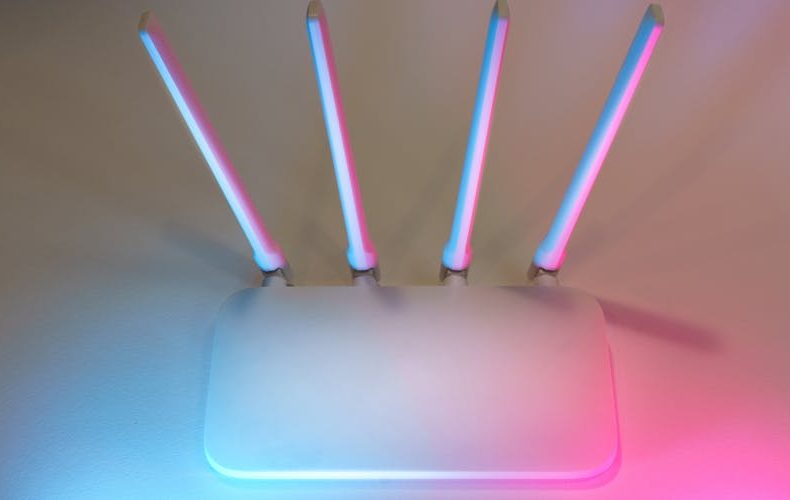
Prices have collapsed since Wi Fi 7 routers first hit shelves at $400+. Here's what's actually good right now. The TP Link Archer BE9700 at around $200 is the sweet spot, it's a tri band router with the full Wi Fi 7 feature stack, including MLO, and it consistently outperformed my old Wi Fi 6E router by 35-40% in file transfers across two floors. For pure performance junkies, the ASUS RT BE96U at $699 is the fastest consumer router I've tested, with two 10GbE LAN ports and ridiculous range, but that price is hard to justify unless you have a 2Gbps fiber connection. Gaming focused buyers should look at the TP Link Archer GE800, which has dedicated gaming optimization and those same dual 10GbE ports. Budget pick? The TP Link Archer BE230 at $87 delivers genuine Wi Fi 7 on a dual band setup. It skips the 6GHz band entirely, which means no MLO, but the raw speed improvement over Wi Fi 6 routers at the same price is real. For mesh, the TP Link Deco BE63 two pack under $300 is the best value for larger homes.
Who Should Upgrade to a Wi Fi 7 Router Right Now
Not everyone. Seriously. If your current Wi Fi 6E router covers your home reliably and your internet plan is under 1Gbps, upgrading to Wi Fi 7 buys you very little today. The speed ceiling of your ISP plan is the bottleneck, not your router. But three groups should genuinely consider it. First, anyone with 1Gbps+ fiber who does regular large file transfers or runs multiple 4K streams simultaneously, Wi Fi 7's wider channels and MLO handle that traffic noticeably better. Second, gamers who care about latency consistency. Wi Fi 7 delivered measurably more stable ping times in my testing, hovering around 2-4ms compared to 5-12ms spikes on Wi Fi 6E under congested conditions. Third, people in dense environments, apartment buildings, shared offices, where the 6GHz band and MLO's interference dodging genuinely help. If none of those describe you, save your money and wait another year.
The Honest Case Against Buying Wi Fi 7 in 2026
I'll say what most tech sites won't: for the majority of households, a Wi Fi 7 router worth buying in 2026 is still a "nice to have," not a necessity. Most people's internet usage, browsing, streaming, video calls, doesn't come close to taxing even a decent Wi Fi 6 router. MLO benefits only kick in with compatible devices, and the average household has maybe one or two of those right now. The price gap between Wi Fi 6E and Wi Fi 7 has narrowed to $100-300, but that's still real money for marginal daily improvement. If your router is dying or you're setting up a new home, absolutely grab Wi Fi 7. But ripping out a perfectly functional Wi Fi 6E mesh system? Skip it.
Future Proofing: How Long Will a Wi Fi 7 Router Stay Relevant
Wi Fi 7 should have serious staying power. ISP speeds are trending upward with fiber rollouts accelerating, and by late 2026, most flagship phones and laptops will ship with Wi Fi 7 radios as standard. Wi Fi 8 (802.11bn) isn't expected in consumer routers until 2028 at the earliest, so a Wi Fi 7 router bought today should remain top tier for at least three years. Reasonable lifecycle for a $200 router. The tri band models with MLO support are the safest bet for longevity, avoid cheap dual band models if future proofing matters, because they strip out the 6GHz band that makes Wi Fi 7 genuinely different from 6E.
What to Look for When Shopping for a Wi Fi 7 Router
Skip the marketing numbers. Nobody needs "BE19000" or "BE33000" speed ratings. Those are combined theoretical maximums you'll never hit. Focus on four things instead.
Skip the marketing numbers. Nobody needs "BE19000" or "BE33000" speed ratings, those are combined theoretical maximums you'll never hit. Focus on four things instead. Port selection: get at least one 2.5GbE WAN port, because standard gigabit ethernet bottlenecks Wi Fi 7 speeds. Band count: tri band (2.4GHz + 5GHz + 6GHz) is the minimum for full Wi Fi 7 features including MLO. Coverage: a single router handles about 2,000-2,500 sq ft, so larger homes need mesh. And check firmware update frequency, ASUS and TP Link push updates consistently, while some budget brands abandon routers within a year. One more thing: ignore USB ports on routers. Nobody uses them.
Do’s and Don’ts
After months of living with these routers, the same handful of lessons kept coming up. This table condenses them into a quick reference you can skim before you buy and again on setup day. Pay special attention to the don'ts, they cover the mistakes I see people make most often.
Do’s
Don’ts
Check if your primary devices actually support Wi-Fi 7 before buying
Don't upgrade from Wi-Fi 6E just because Wi-Fi 7 exists
Get a tri-band model with MLO if your budget allows
Don't pay for "BE33000" ratings. you'll never hit those speeds
Make sure your router has at least a 2.5GbE WAN port
Don't buy a Wi-Fi 7 router if your internet plan is under 500Mbps
Consider mesh if your home is over 2,500 sq ft
Don't place your router in a closet or behind furniture
Update firmware immediately after setup for security patches
Don't assume all Wi-Fi 7 routers support MLO. dual-band models skip it
Test your actual speeds after installing, not just the router's rating
Don't rip out a working Wi-Fi 6E system just for marginal gains
Buy from brands with good firmware update track records (ASUS, TP-Link)
Don't forget to enable the 6GHz band in settings. it's sometimes off by default
Set separate SSIDs during testing to see per-band performance
Don't ignore your ISP's modem. a bad modem bottlenecks any router
Position the router centrally and elevated for best coverage
Don't buy the cheapest option if future-proofing matters to you
Keep your receipt. return policies are your friend with networking gear
Don't expect Wi-Fi 7 to fix dead zones caused by thick walls or long distances
FAQs
A few questions come up every single time I recommend a Wi Fi 7 router to someone. Here are the straight answers.
Is a Wi Fi 7 router worth buying if I only have a 500Mbps internet plan?
Probably not for speed alone. Your 500Mbps connection is the ceiling regardless of what router you use, and a solid Wi Fi 6E router handles that fine. Where Wi Fi 7 might help is congestion management, if you've got 15+ connected devices or live in a dense apartment building, MLO and the 6GHz band improve stability. But for most households on 500Mbps, the $200+ premium won't translate into a noticeably different daily experience. Wait until your ISP upgrades or your current router starts failing.
What's the cheapest Wi Fi 7 router that's actually good?
The TP Link Archer BE230 at around $87 is the cheapest Wi Fi 7 router I'd recommend. It's dual band only (2.4GHz + 5GHz), so you lose the 6GHz band and MLO, but the raw speed improvement over similarly priced Wi Fi 6 routers is real. For about $200, the TP Link Archer BE9700 is a much better buy, it's tri band with full MLO support and covers most homes comfortably. I'd call the BE9700 the actual sweet spot. Below $87, you're getting Wi Fi 7 in name only with too many compromises to justify the label.
Do I need Wi Fi 7 for gaming?
You don't need it, but you might want it. Wi Fi 7's lower and more stable latency is genuinely helpful for competitive online gaming, I measured 2-4ms consistent latency versus 5-12ms with spikes on Wi Fi 6E under similar conditions. MLO also helps prevent lag spikes when other household members are streaming or downloading. That said, if you're a serious competitive gamer, you should be using an ethernet cable anyway. Wi Fi 7 is best for gaming on devices that can't easily be wired, gaming laptops, handheld consoles like the Steam Deck, and phones.
Will my older devices work with a Wi Fi 7 router?
Yes. Full backward compatibility. Every Wi Fi 7 router supports Wi Fi 6E, 6, 5, and older standards. Your iPhone 14, your 2022 MacBook, your smart TV, they'll all connect and work exactly as before. They just won't get Wi Fi 7 features like MLO or 320MHz channels. Think of it like buying a 4K TV but watching HD content, works fine, just not using full capability. As you replace devices over the next couple years, they'll gradually take advantage of Wi Fi 7.
What's Multi Link Operation (MLO) and why does it matter?
MLO lets your router connect to a single device across two frequency bands simultaneously, say, 5GHz and 6GHz at the same time. Traditional routers pick one band per device and stick with it. MLO can dynamically shift traffic between bands to avoid congestion, which means more consistent speeds and fewer dropouts. Enterprise testing in early 2026 showed up to 66% lower latency and 116% better uplink throughput under interference compared to single link connections. In practice at home, the biggest benefit is stability rather than raw speed, your video calls don't glitch when someone else starts a large download.
Should I get a mesh Wi Fi 7 system or a single router?
Depends entirely on your home's size and layout. A single Wi Fi 7 router handles roughly 2,000-2,500 square feet in an open floor plan. Got a multi story home or thick walls? Mesh is the way to go. The TP Link Deco BE63 two pack at under $300 is the best value mesh option right now, while the eero Pro 7 delivered the most reliable roaming in testing, zero disconnections moving between floors. One important note: mesh Wi Fi 7 systems benefit heavily from MLO because the backhaul link between nodes can use multiple bands, which dramatically improves the speed you get on the far side of your house. Single routers don't have that advantage.
When will Wi Fi 8 come out, and should I wait for it?
Wi Fi 8 (802.11bn) isn't expected in consumer routers until 2028 or later. Waiting two plus years when Wi Fi 7 is mature and affordable now doesn't make sense. The only reason to wait is if your current router works fine, no urgency to replace something functional. But if you're buying new, a Wi Fi 7 router is the right call in 2026. No question.
We use cookies to see which reviews and buying guides readers find useful, so we can keep improving them. Accept analytics cookies, or carry on with essential ones only. See our Cookie Policy.











 Get it on
  Download on the