






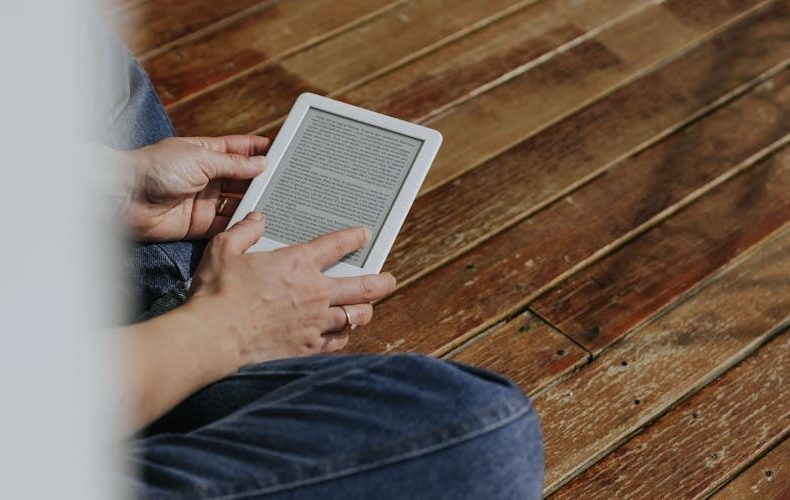
Picking an e reader shouldn't be this complicated, yet here we are. Amazon's got four Kindle models. Kobo's pushing color displays on everything. Boox is running full Android on e ink hardware. I've spent the last few months bouncing between a Kindle Paperwhite, a Kobo Libra Colour, and a Boox Go Color 7, and the honest truth is that each one does something the others can't. The question isn't which e reader is "the best", it's which one fits how you actually read. If you burn through Kindle Unlimited titles on the couch, you need different hardware than someone borrowing library books through OverDrive or reading manga in color on their commute.
Here's what I can tell you after testing the best e readers 2026 currently offers: the gap between cheap and expensive has never been smaller. A $110 Kindle Basic now has the same 300 PPI screen that cost $200 three years ago. Kobo's $130 Clara BW handles library lending better than anything Amazon makes. And if you want color, there are at least five solid color e ink devices under $300 right now. This guide breaks down every major e reader worth buying, with real specs, actual prices, and blunt opinions you won't find in a press release rewrite. Just what I'd actually recommend to a friend.
Kindle Paperwhite: Still the Best E Readers 2026 Default Pick
The Kindle Paperwhite sits at $159, and for pure reading, nothing else at this price does it better. Period. The 7 inch, 300 PPI display is razor sharp, text looks like a printed page, not a screen. Amazon bumped page turn speed by 25% over the previous generation, and you feel it. Swiping through a novel is nearly instant now, with none of that ghosting flicker that plagued older e ink panels. Battery life is rated at 12 weeks, which tracks with my experience. I charged mine in early January and didn't plug it in again until late February.
Warm light adjustment is genuinely useful. Shifting from cool white during the day to amber at night means my eyes don't get torched at 11 PM. IPX8 waterproof for bathtub and pool reading. USB C charging finally replaced Micro USB. The one real knock? No physical page turn buttons. If you've used a Kobo Libra with those buttons, swipe only feels like a downgrade. The Signature Edition adds wireless charging and auto brightness for $199, but unless you're allergic to plugging in a cable once a month, save the $40.


Kobo Libra Colour: The Most Complete E Reader Available
At $229.99, the Kobo Libra Colour doesn't get the attention it deserves. Shame. The 7 inch Kaleido 3 display delivers full 300 PPI for black and white text and adds a 150 PPI color layer for book covers, comics, and highlights. Colors are muted compared to an iPad, sure. But for graphic novels and manga, any color on e ink is a massive upgrade over grayscale. Physical page turn buttons, waterproofing, and native OverDrive library integration, link your library card, browse the catalog, borrow books without touching a phone. I borrowed 14 books in one month without spending a dollar.
Amazon's competing Kindle Colorsoft costs $279.99 for essentially the same Kaleido 3 technology, same 300 PPI mono, same 150 PPI color. The Colorsoft benefits from Amazon's ecosystem (Kindle Unlimited, Whispersync, the massive ebook store), but you're paying $50 more than the Kobo while losing physical buttons and native library lending. If you're already deep in Amazon's world, the Colorsoft makes sense. Otherwise, the Libra Colour offers more for less. Kobo also supports EPUB natively, letting you sideload books from basically anywhere.


Kobo Clara BW: Best Value in the Best E Readers 2026 Lineup
The Kobo Clara BW at $129.99 is the value king. The 6 inch E Ink Carta 1300 display hits 300 PPI at 1448 x 1072 resolution, text just as crisp as devices costing twice as much. Waterproof. ComfortLight PRO with warm light adjustment. 16GB of storage, roughly 12,000 books. You'll run out of lifetime before you run out of space.
OverDrive is baked directly into the device. Library borrowing on Kindle requires workarounds through the Libby app on your phone, then sending books to the Kindle, clunky at best. On the Clara BW, you tap OverDrive in the menu, sign in with your library card, and borrow. Done. One screen. The smaller 6 inch screen won't suit everyone, especially coming from a 7 inch Paperwhite, but for commuting and one handed reading, the compact size is actually a plus.


Boox Go Color 7: The Android Wild Card
Boox doesn't play by Kindle or Kobo rules. The Go Color 7 Gen II runs full Android with Google Play Store access, install Kindle, Kobo, Libby, Hoopla, comics apps, even Pocket for saved articles on one device. No ecosystem lock in. The 7 inch Kaleido 3 display matches the color specs of competing models at 300 PPI mono and 150 PPI color, with 4GB of RAM and 64GB storage.
The flexibility is unmatched. Tweak refresh rates, contrast settings, and app specific display modes in ways locked down readers don't allow. But the software experience isn't as polished. Menus can feel sluggish, app optimization varies wildly, and battery life takes a hit running a full Android OS. I got about 3-4 weeks per charge versus 8-12 weeks on dedicated readers. If you read from multiple stores, Boox is the move. If you just want to sit down and read, simpler platforms win.


Kindle Scribe Colorsoft: When You Need More Than Reading
At $629.99, this isn't competing with regular e readers. It's Amazon's play against the reMarkable 2 for digital note takers who also read. The 11 inch color e ink display looks stunning for books. The included Premium Pen writes with under 12ms latency, and the texture molded glass genuinely feels like pen on paper. For readers only, absolutely not worth it, buy a Paperwhite and pocket $470. But students annotating textbooks or professionals marking up documents get real value from the combination. Battery runs about 8 weeks reading only, 4 weeks with heavy writing.


Budget Picks: Best E Readers Under $120
The 2024 Kindle Basic at $109.99 (frequently on sale for $89.99) finally became a legitimate recommendation. Amazon upgraded the screen to 300 PPI and swapped in USB C. For under $100 on sale, that's remarkable. Tradeoffs are real though: no waterproofing, no warm light, and a smaller 6 inch screen. If you read exclusively indoors and don't care about nighttime eye comfort, saving $60-70 versus the Paperwhite is genuinely hard to argue against. One tip, refurbished Kindle Paperwhites from Amazon's official refurb store regularly appear around $100-110 with a full warranty. That's the actual best budget deal if you can catch one in stock.

Do’s and Don’ts
E readers are simple devices, but a few buying habits separate a purchase you love from one you quietly regret. This table collects the lessons from months of switching between Kindle, Kobo, and Boox hardware. Run through it before you click buy and you'll dodge the most common mistakes.
| Do’s | Don’ts |
|---|---|
| Test-hold a device before buying. ergonomics matter more than specs for daily comfort | Don't buy a color e-reader just for novels. you won't notice the color 95% of the time |
| Check your local library's OverDrive compatibility before choosing Kindle or Kobo | Don't assume Kindle has the biggest ebook store in your country. Kobo dominates in Canada, Japan, and parts of Europe |
| Buy a case with auto-wake. magnetic sleep/wake saves meaningful battery | Don't spend extra on 32GB+ storage unless you keep audiobooks on-device. ebooks are tiny files |
| Use warm light at night. it's not a gimmick, your sleep quality will thank you | Don't buy a Boox expecting Kindle-level simplicity. powerful but requires tinkering |
| Enable airplane mode while reading. extends battery from weeks to months | Don't ignore refurbished options from official stores. same warranty, 30-40% savings |
| Consider the Kobo Clara BW at $130 before the $159 Paperwhite. the value gap is real | Don't pay for Kindle Unlimited if your library has a good digital catalog. OverDrive is free |
| Sideload EPUB files on Kobo if you buy DRM-free books from Smashwords or Google Books | Don't buy the Kindle Scribe Colorsoft purely for reading. a $159 Paperwhite reads identically |
| Update firmware regularly. manufacturers push meaningful improvements quarterly | Don't dismiss e-ink because you tried a bad one in 2018. modern 300 PPI screens are drastically better |
| Compare screen sizes in person. the jump from 6" to 7" feels bigger than the numbers suggest | Don't forget Kindle books are locked to Amazon's ecosystem. you can't transfer them to Kobo |
| Read reviews from actual users, not just tech sites. long-term reliability matters most | Don't chase the newest model if last year's version is discounted. e-reader improvements are incremental |

FAQs
What's the best e reader for most people in 2026?
The Kindle Paperwhite at $159 remains the safest recommendation. Sharp 300 PPI 7 inch screen, 12 week battery, waterproofing, warm light, USB C. Amazon's ebook store is the world's largest, and Whispersync keeps your position synced across devices flawlessly. The only reason to look elsewhere is if you want library lending without workarounds, color, or physical buttons, the Kobo Libra Colour at $229.99 covers all three.
Is a color e reader worth it in 2026?
Depends on what you read. Novels and nonfiction? Save your money, color adds nothing to black text. But manga, comics, graphic novels, or illustrated nonfiction? The Kaleido 3 color layer makes a genuine difference. Calibrate expectations though: 150 PPI color looks like decent magazine print, not an iPad. The Kobo Libra Colour at $229.99 or Kindle Colorsoft at $279.99 are the top two options.
Can I borrow library books on a Kindle?
Technically yes, but it's clunky. You need the Libby app on your phone, find the book, then send it to your Kindle through Amazon's website, a multi step process across devices and apps. Kobo's approach is dramatically simpler with OverDrive built directly into the device. Sign in with your library card once and browse, borrow, and read without leaving the e reader. If library lending matters to you, Kobo wins by a wide margin.
How long do e reader batteries actually last?
Dedicated readers like Kindles and Kobos genuinely last 8-12 weeks on a charge with typical use, about 30-60 minutes daily with WiFi off. Not marketing hype. Boox devices drain faster at 3-4 weeks because they run a full Android OS. The Kindle Scribe Colorsoft lands around 4-8 weeks depending on reading versus writing. Keep WiFi and Bluetooth off when not downloading books, that's the single easiest battery trick.
Should I buy a Boox e reader instead of a Kindle or Kobo?
Only if you need app flexibility. Boox runs Android with full Google Play, so you can install every reading app on one device. Powerful for multi store readers. The downside: less polished software, shorter battery, steeper learning curve. If you enjoy tweaking settings, Boox is rewarding. If you want to pick up a device and just read, Kindle or Kobo.
What file formats do e readers support?
Kindle supports AZW3, MOBI, recently added EPUB, plus PDF and TXT. Kobo natively handles EPUB, PDF, MOBI, and more, it's been the format friendlier option for years. Boox supports whatever apps you install, so format limitations don't exist. If you have a large EPUB library from non Amazon sources, Kobo or Boox gives the smoothest experience.
Related Posts:


Twenty years from now you will be more disappointed by the things that you didn’t do than by the ones you did do. Sail away from the safe harbor.
 Get it on
  Download on the