






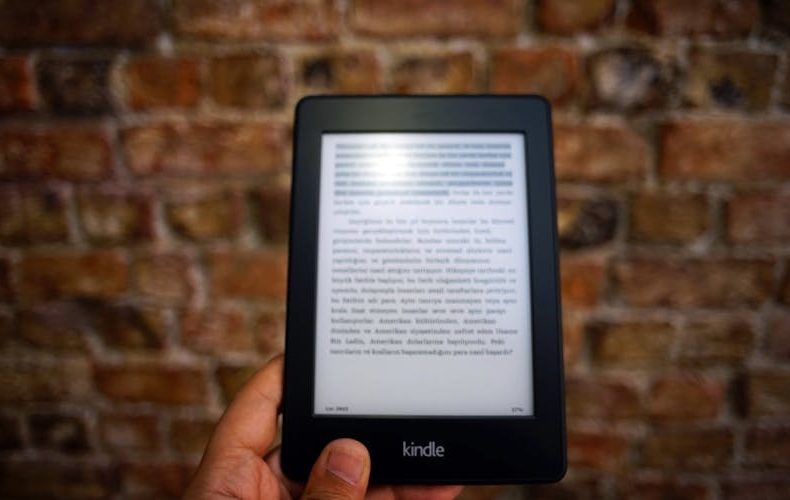
If you've been eyeing a dedicated e reader and feeling overwhelmed by Amazon's lineup, the Kindle Paperwhite 6 is probably the one you should just buy and stop overthinking. I've been using this 12th generation model since late 2024, carried it through two international trips, and dropped it in a hotel bathtub once (intentionally, for science). That 7 inch E Ink Carta 1300 display with 300 PPI is genuinely pleasant to stare at for hours. Not "good for an e reader" pleasant. Actually pleasant. The contrast is noticeably deeper than the 11th gen, with blacks that look properly inky rather than washed out grey.
This Kindle Paperwhite 6 review covers what actually matters day to day, not just specs. Is the $159 base model worth it over the $199 Signature Edition? Does that "12 weeks of battery" claim hold up with the warm light cranked at night? Are the software bugs Amazon's been shipping a dealbreaker? I've tested all of that, compared it side by side with my old Paperwhite 5 and a Kobo Clara BW. Not a spec sheet regurgitation, just what happens when you live with this thing for over a year.
The 7 Inch E Ink Carta 1300 Display Is the Real Upgrade
The jump from 6.8 inches on the Paperwhite 5 to 7 inches here doesn't sound like much on paper. It is. The narrower bezels mean the device itself barely grew, but you get noticeably more text per page. I counted roughly 15% more words on screen with my preferred font size, which translates to fewer page turns per chapter. The E Ink Carta 1300 panel delivers a genuine 25% contrast improvement over the previous generation, side by side, the Paperwhite 5's screen looks like it has a thin grey film over it. Page turns are snappy, clocking in about 25% faster than the 11th gen at launch, though Amazon later pushed a software update that closed most of that gap on the older model. Still faster on the new one. Just not by as dramatic a margin anymore.
The 300 PPI resolution carries over, and it remains the point where printed text and e-ink become hard to tell apart at normal reading distance. Crisp fonts matter more than any spec sheet suggests, because your eyes log hours on this panel, not minutes. Glare is a non issue thanks to the flush front glass, and the deeper blacks make dense nonfiction and small type noticeably easier to parse than on the outgoing model.


Kindle Paperwhite 6 Review: Battery Life Claims vs. Reality
Amazon claims up to 12 weeks on a single charge from the 1,900 mAh battery. That number assumes 30 minutes of reading per day at brightness 13 with Wi Fi off. Realistic? Barely. I read about 90 minutes a day with warm light at 40% brightness and Wi Fi on, and I get 5-6 weeks between charges. Still absurd, my phone doesn't last a full day. Charges to full in 2.5 hours over USB C, half what the Paperwhite 5 needed. One genuine complaint: firmware update 5.19.3 caused battery drain severe enough that Amazon paused the rollout. If your battery suddenly tanks, check your firmware version.


$159 Base vs. $199 Signature Edition: Where Your Money Goes
The base Kindle Paperwhite 6 starts at $159 with lock screen ads. Remove the ads and you're at $179. The Signature Edition costs $199 with no ads, 32GB instead of 16GB, wireless Qi charging, and an auto brightness sensor. Here's the thing most people miss: if you're already paying $179 for ad free, you're $20 away from the Signature Edition. Twenty bucks for double the storage, wireless charging, and auto brightness. No brainer. But if you're fine with ads? The $159 base reads identically. Same display, processor, battery, waterproofing. Ads only show on the lock screen and never interrupt reading. I ran the base model for three months and forgot they were there.

Waterproofing, Warm Light, and Reading After Dark
IPX8 rated for up to 2 meters of fresh water for 60 minutes. Real numbers, not marketing fluff. I've read this thing in the bath, by the pool, and in a rainstorm at a bus stop. Zero issues. The flush front design means water rolls right off. Fair warning though: the touchscreen gets unreliable when actually submerged. You can't swipe pages underwater, and there are no physical buttons. Read near water, not in it.
The adjustable warm light shifts the display from cool white to amber, and it's one of those features you don't think you need until you use it at midnight. I keep mine at about 60% warmth and 30% brightness for nighttime reading, and my partner hasn't complained once about light bleed in bed. The Signature Edition's auto brightness sensor handles transitions automatically, dim room to sunny patio adjusts in about two seconds. The base model needs manual adjustment, which takes three swipes. Mildly annoying, not a dealbreaker.

Kindle Paperwhite 6 Review: Software and Ecosystem
The reading software is mature, polished, and occasionally infuriating. Library management works fine for the first few hundred books, then gets sluggish. The big win is full Libby/OverDrive support, borrow ebooks from your local library and send them directly to the Kindle. Free books. Legitimately. X Ray, Word Wise, and the built in dictionary remain excellent. Kindle Unlimited at $11.99/month is fine but skews heavily toward self published titles. The store browses fast on this generation, previous Kindles made shopping feel like dial up internet. One concern: firmware 5.18.6 (September 2025) left some users reporting screen flickering and blank popup bugs. Software quality has been inconsistent.

Should You Upgrade From the Paperwhite 5?
Probably not, unless your current device is dying. The improvements are real but incremental, slightly larger screen, better contrast, faster charging (2.5 hours versus 5). Amazon's software update even brought the Paperwhite 5's page turn speed close to the 12th gen. If yours works fine, keep it another cycle. Coming from a Paperwhite 4 or older? Absolutely upgrade. The jump from anything pre 2021 is massive. Never owned a Kindle at all? The Paperwhite 6 at $159 is the best entry point Amazon has ever offered.

How It Stacks Up Against the Competition
The Kobo Clara BW at $149 offers a 6 inch E Ink screen with native Pocket integration and built in OverDrive. Lighter, cheaper, not locked into Amazon. But the screen is noticeably smaller, and Kobo's store has fewer titles. The Kobo Libra Colour at $219 adds color and page turn buttons, which some readers swear by. If you're deep in Amazon's ecosystem, Kindle Unlimited, Audible, Whispersync, the Paperwhite 6 is the obvious pick. If you hate Amazon on principle, Kobo's solid. Purely on hardware and reading experience at this price though? The Paperwhite wins.

Do’s and Don’ts
A year with the Paperwhite 6 has produced a short list of habits that make the device better and mistakes that are easy to avoid. The table below is the condensed version. Run through it once after setup and you will dodge most of the complaints that fill the review sections.
| Do’s | Don’ts |
|---|---|
| Buy the Signature Edition if you're already removing ads ($20 more for double storage, wireless charging, auto-brightness) | Don't upgrade from a Paperwhite 5 unless yours is physically failing |
| Enable the warm light for nighttime reading . your eyes will thank you | Don't leave Wi-Fi on 24/7 if you care about maximizing battery life |
| Use Libby/OverDrive to borrow free ebooks from your local library | Don't buy a case that blocks the ambient light sensor on the Signature Edition |
| Check your firmware version if battery life suddenly drops | Don't expect the touchscreen to work reliably while the device is submerged |
| Organize books into collections early before your library grows unwieldy | Don't pay for Kindle Unlimited without checking your library's free selection first |
| Turn off page refresh for smoother reading (Settings > Reading Options) | Don't compare e-ink page turns to tablet speed . they're different tech entirely |
| Use airplane mode during long reading sessions to stretch battery to 10+ weeks | Don't ignore the USB-C cable that ships in the box . third-party cables sometimes charge slower |
| Download books over Wi-Fi before traveling . sideloading via USB-C works but is clunky | Don't buy the 2021 Paperwhite 5 at "discount" prices when the 6 is only $10-20 more |
| Register your Kindle to get free cloud backup of all highlights and notes | Don't assume all ebook formats work . Kindle reads MOBI, AZW3, and EPUB (finally) but not CBR/CBZ |
| Try the built-in dictionary and X-Ray features for nonfiction . genuinely useful | Don't skip the setup wizard . it configures font rendering and display settings properly |
The battery advice deserves the most attention, because nearly every disappointed owner traces back to the same two causes. Wi-Fi left on around the clock quietly drains the cell, and a buggy firmware release can do the same, so airplane mode during long sessions and a quick firmware check when something feels off will keep you in the multi week range Amazon promises. The library tip is the sleeper hit. Between Libby borrowing and the native EPUB support, you can keep a Kindle fed for years without paying for Kindle Unlimited, which makes the subscription an optional extra rather than a hidden cost. And take the sizing of your purchase seriously. If you are already paying to remove ads, the Signature Edition's extra storage and auto brightness cost so little more that skipping them is the one decision most owners regret.

FAQs
Is the Kindle Paperwhite 6 worth buying in 2026?
Absolutely. At $159 for the base model, it remains the best value in dedicated e readers. The 7 inch 300 PPI display delivers paper like text that tablets can't match for extended reading. Realistically 5-6 weeks of battery with heavy use. Unless you need color for comics or magazines, this is the one to buy.
Does the Kindle Paperwhite 6 support EPUB files?
Yes. Amazon finally added native EPUB support, which was long overdue. Sideload via USB C or send through the Send to Kindle email address. Formatting isn't always perfect with complex layouts, but standard novels and nonfiction work well. This single feature eliminated the biggest reason people chose Kobo over Kindle.
How does the Kindle Paperwhite Signature Edition differ from the standard model?
Three things: 32GB storage instead of 16GB, auto brightness ambient light sensor, and Qi wireless charging. Both share the identical 7 inch display, processor, 1,900 mAh battery, and IPX8 waterproofing. The Signature Edition is $199 ad free versus $179 for the ad free standard. That $20 gap makes it strong value.
Can I read Kindle Paperwhite 6 in direct sunlight?
This is where e ink genuinely shines, literally. Unlike LCD or OLED screens that wash out in bright light, the Paperwhite 6's display gets easier to read as ambient light increases. I've read on beaches in full midday sun without glare issues. Turn the front light to zero outdoors and save battery too. It's one of the strongest arguments for a dedicated e reader over your phone.
Is 16GB enough storage for the base Kindle Paperwhite?
For most readers, easily. A typical ebook runs 2-5MB, so 16GB holds roughly 3,000-8,000 books. Audiobooks are the exception at 50-150MB each, heavy Audible users should consider the 32GB Signature Edition. I've had over 400 books on my 16GB model with 11GB still free.
What's the biggest complaint about the Kindle Paperwhite 6?
Software quality. Amazon's firmware updates in 2025 introduced battery drain bugs, firmware 5.19.3 was bad enough they paused the rollout. Screen flickering and blank popup errors hit some units too. The hardware is rock solid, but the software team has been shipping insufficiently tested updates. Most issues get patched within weeks, but it's frustrating for a company with Amazon's resources.
Does the Kindle Paperwhite 6 work with Libby and library books?
Yes, full Libby/OverDrive integration. Borrow ebooks from your local library through the Libby app, send them directly to your Kindle. They appear just like purchased titles with syncing, highlights, and bookmarks, then auto return after the lending period. Completely free with a library card. Genuinely one of the best reasons to own a Kindle.
How long does the Kindle Paperwhite 6 take to charge?
About 2.5 hours from empty to full over USB C, a huge improvement over the Paperwhite 5's 5 hour charge time. The Signature Edition supports Qi wireless charging too, though that's slower at 3.5-4 hours. You're only charging every few weeks anyway, so the charge time barely matters. Plug it in before bed and forget about it.
Related Posts:






Twenty years from now you will be more disappointed by the things that you didn’t do than by the ones you did do. Sail away from the safe harbor.
 Get it on
  Download on the