Apple Watch SE 3 vs Apple Watch Series 11: Do You Really Need the Upgrade?
Apple dropped both the Watch SE 3 and Series 11 in September 2025, and picking between them has become genuinely tricky. The SE 3 starts at $249 for GPS-only, while the Series 11 opens at $399 — a $150 gap that sounds significant until you realize the SE 3 now packs features that were exclusive to flagship models just two years ago. We’re talking an Always-On display, wrist temperature sensing, sleep apnea detection, fast charging, and even 5G cellular. Apple basically took everything people loved about the Series 9 and crammed it into a $249 watch with a recycled aluminum case. The Series 11 still has the edge in health sensors, display brightness, and build quality, but the real question is whether those extras matter enough to justify spending an additional $150. For a lot of people, I think the answer is no — and that’s not a knock on the Series 11.
I’ve been wearing both watches on alternate wrists for weeks now (yes, I looked ridiculous), and my honest takeaway is that the Apple Watch SE 3 is the most impressive budget smartwatch Apple has ever released. It handles notifications, workouts, Apple Pay, and sleep tracking without a single hiccup. The Series 11 pulls ahead when you start caring about ECG readings, blood oxygen monitoring, and hypertension alerts — features that genuinely matter if you’re tracking a heart condition or you’re over 40 and want comprehensive cardiovascular data. But if you’re a 28-year-old who wants a solid fitness tracker with iPhone integration and Siri on your wrist, the SE 3 does everything you need at $150 less. I’m going to break down every meaningful difference across design, health, performance, battery, and price so you can make a decision based on facts, not marketing.
Design and Display: Thinner vs. Cheaper
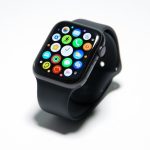
The Series 11 comes in 42mm and 46mm case sizes, while the SE 3 sticks with 40mm and 44mm. That size difference matters more than the numbers suggest — the Series 11 is almost 10% thinner than the SE 3, which makes it noticeably more comfortable under shirt cuffs and during sleep tracking. Apple also offers the Series 11 in both aluminum and titanium finishes, whereas the SE 3 is aluminum-only in two matte colors. Both watches use Ion-X glass on the aluminum models, but the Series 11 adds a ceramic coating for extra scratch resistance, and titanium Series 11 models get sapphire crystal, which is essentially scratch-proof. The SE 3’s recycled aluminum case looks and feels perfectly fine — you won’t mistake it for a cheap product — but the Series 11 has a more premium feel, especially in titanium. If you’re buying a case or band that covers most of the watch body anyway, the design gap shrinks considerably.
The display situation is where things get interesting. Both watches have Always-On OLED screens, which is a first for any Apple Watch SE model. The SE 3 tops out at 1,000 nits of peak brightness, while the Series 11 cranks up to 2,000 nits with a wide-angle OLED that’s easier to read at extreme angles. In daily indoor use, both screens look sharp and vibrant. The brightness gap only becomes obvious outdoors in direct sunlight — the Series 11 is genuinely easier to read on a sunny run. The Series 11 also has a 2.0-inch display on the 46mm model compared to the SE 3’s 1.8-inch panel on the 44mm, giving you more room for complications and text. If you spend a lot of time exercising outdoors, the Series 11 display is noticeably better. For checking notifications at your desk, both look great.
Health Sensors: The Biggest Gap Between These Two
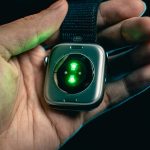
This is where the $150 really shows up. The Apple Watch SE 3 includes a second-generation optical heart rate sensor and wrist temperature sensing, which powers features like sleep tracking with sleep scores, retrospective ovulation estimates in the Cycle Tracking app, the Vitals app for overnight health metrics, and sleep apnea notifications. That’s a solid health package — far better than any $249 smartwatch has a right to deliver. You also get Crash Detection and Fall Detection for safety, plus irregular heart rhythm notifications. For a healthy person who wants to track fitness metrics and sleep quality, the SE 3 covers the bases well.
The Series 11, though, brings out the heavy artillery. On top of everything the SE 3 offers, you get a full ECG app that can generate a single-lead electrocardiogram right from your wrist to check for atrial fibrillation. There’s a blood oxygen sensor (SpO2) for on-demand and background readings throughout the day and night. And the headline feature for 2025: hypertension notifications. The Series 11 uses its optical sensor to analyze how your blood vessels respond to heartbeats over 30-day windows, and it can alert you if it detects patterns consistent with high blood pressure. That’s a genuinely useful health feature — high blood pressure affects nearly half of American adults and most don’t know they have it. If you have a family history of heart disease, if you’re managing a cardiovascular condition, or if you simply want the most comprehensive wrist-based health monitoring available, the Series 11 is worth every penny of that $150 premium. If you’re young and healthy with no cardiac concerns, the SE 3’s sensor suite is more than adequate.
Performance and Chip: Same Brain, Different Body
Here’s something that surprises most people: both the SE 3 and Series 11 run on the Apple S10 chip. Apple didn’t introduce a new processor for the Series 11 — it’s the first year they’ve reused a chip in the flagship model. Both watches also have 1GB of RAM and 64GB of storage, which is quadruple the 16GB that older Apple Watches shipped with. In everyday use, they’re equally snappy. Apps launch at the same speed, Siri responds just as quickly, and workout tracking is smooth on both. The 64GB storage means you can load a serious music library for offline listening during runs without your iPhone — something that was genuinely cramped on older 32GB models.
Where you might notice a difference is in long-term software support. Apple typically supports flagship models for one generation longer than SE models, so the Series 11 could theoretically receive watchOS updates for an extra year or two down the road. That’s speculative, though — Apple hasn’t officially committed to specific timelines. Both watches support the full suite of watchOS 12 features including the redesigned Smart Stack, interactive widgets, and Apple Intelligence integration. The SE 3 also supports 5G cellular (if you spring for the cellular model at $299), matching the Series 11’s connectivity. Performance is genuinely a non-factor in this comparison right now.
Battery Life: The SE 3 Actually Wins (Sort Of)
Apple rates the SE 3 at 18 hours of normal use and up to 32 hours in Low Power Mode. The Series 11 gets 24 hours of normal use and 28 hours in Low Power Mode. So the Series 11 lasts longer in standard mode — about 6 extra hours — but the SE 3 actually outlasts it in Low Power Mode by 4 hours. Both watches support fast charging for the first time on the SE line, and Apple claims 15 minutes on the charger gives you about 8 hours of battery. That fast charging stat is identical for both watches and it’s a game-changer for people who forget to charge overnight — toss it on the charger while you shower and you’re good for the workday.
In my real-world testing, the Series 11 consistently made it through a full day plus overnight sleep tracking with about 15-20% left by morning. The SE 3 needed a top-up before bed if I wanted to track sleep after a full day of use with the Always-On display enabled. Turning off the Always-On display on the SE 3 closes the gap significantly — I’d regularly hit 30+ hours. So the Series 11 handles the “wear it all day and track your sleep without charging” use case better. The SE 3 can do it too, but you’ll want to charge during your evening shower. For most people, both watches require daily charging anyway, so the practical difference is smaller than the specs suggest.
Price and Value: Where Each Watch Makes Sense
Let’s lay out the full pricing picture. The Apple Watch SE 3 starts at $249 for 40mm GPS, $279 for 44mm GPS, $299 for 40mm GPS+Cellular, and $329 for 44mm GPS+Cellular. The Series 11 starts at $399 for 42mm GPS aluminum, $429 for 46mm GPS aluminum, $499 for 42mm GPS+Cellular aluminum, and $529 for 46mm GPS+Cellular aluminum. Titanium Series 11 models start at $699. At every comparable tier, the gap is roughly $150-$170. That’s not pocket change, but it’s not the $300+ gap you see between iPhone models either.
The SE 3 is the obvious pick for first-time Apple Watch buyers, kids getting their first smartwatch via Family Setup, people upgrading from a Series 4 or 5 who want a modern experience without spending flagship money, and anyone who primarily wants fitness tracking and iPhone notifications. The Series 11 earns its price if you need ECG and blood oxygen monitoring, you want hypertension alerts, you exercise outdoors frequently and need the brighter display, you want titanium build quality, or you plan to keep the watch for 4-5 years and want maximum software longevity. If you’re genuinely torn, buy the SE 3 and put the $150 savings toward a nice band or an extra charging cable for your office. You won’t feel like you’re missing out.
Do’s and Don’ts: Apple Watch SE 3 vs Series 11
Do’s
Don’ts
Do buy the SE 3 if you’re a first-time Apple Watch buyer — it has everything you need at $249
Don’t assume the Series 11 is automatically the better buy just because it costs more
Do get the Series 11 if you have a family history of heart disease and want ECG plus hypertension alerts
Don’t pay $150 extra for health sensors you’ll never actually check or act on
Do consider the SE 3’s 32-hour Low Power Mode if battery anxiety is your biggest concern
Don’t forget that both watches use the exact same S10 chip — performance is identical
Do spring for the Series 11 if you run or cycle outdoors frequently and need a 2,000-nit display
Don’t buy the titanium Series 11 at $699 unless scratch resistance truly matters to you
Do take advantage of the SE 3’s Always-On display — it’s a first for the SE line and works beautifully
Don’t overlook the SE 3’s wrist temperature sensing — it powers sleep scores and cycle tracking
Do pick the cellular model if you want to leave your iPhone at home during runs — both watches support 5G
Don’t spend $299 on SE 3 cellular if you always carry your phone — GPS-only at $249 is enough
Do factor in band costs — both watches use the same bands, so your collection carries over
Don’t ignore the size difference — try both on your wrist at an Apple Store before ordering
Do choose the Series 11 if you plan to keep the watch 4-5 years for longer software support
Don’t buy the Series 11 just for the blood oxygen sensor if you have no medical reason to track SpO2
Do use the $150 savings from the SE 3 toward AppleCare+ — accidental damage coverage is worth it
Don’t assume the SE 3 feels cheap — the recycled aluminum build is solid and looks great
Do compare cellular plan costs with your carrier — some charge $10-15/month on top of the watch price
Don’t skip fast charging accessories — both watches charge 2x faster than previous SE models
Frequently Asked Questions
Is the Apple Watch SE 3 really worth buying in 2026?
Absolutely. The SE 3 is the best value in Apple’s entire wearable lineup right now. At $249, you get an Always-On OLED display, the S10 chip (same as the Series 11), wrist temperature sensing, sleep apnea detection, 5G cellular option, fast charging, 64GB of storage, and Crash Detection. Two years ago, most of these features were exclusive to $400+ models. The SE 3 handles daily notifications, workout tracking, Apple Pay, and Siri without compromise. Unless you specifically need ECG, blood oxygen monitoring, or hypertension alerts, the SE 3 delivers 90% of the Apple Watch experience at 60% of the flagship price. It’s the watch I recommend to friends and family who ask me which Apple Watch to buy.
What health features does the Series 11 have that the SE 3 doesn’t?
The Series 11 adds three major health sensors the SE 3 lacks: an ECG app for detecting atrial fibrillation (a common heart rhythm disorder), a blood oxygen sensor (SpO2) for on-demand and continuous background readings, and hypertension notifications that analyze 30 days of blood vessel data to flag potential high blood pressure. The Series 11 also has an electrical heart sensor in addition to the optical one. These features are genuinely valuable for people managing cardiovascular conditions, those over 40 who want proactive heart monitoring, or anyone with a family history of heart disease. For healthy younger adults, the SE 3’s heart rate monitoring, sleep apnea detection, and temperature sensing cover the wellness basics well.
Do both watches have the same processor?
Yes, and this is one of the most surprising facts about the 2025 lineup. Both the Apple Watch SE 3 and Series 11 run on the Apple S10 chip with 1GB of RAM and 64GB of storage. Apple didn’t create a new chip for the Series 11 — it’s the first year they’ve reused a processor in the flagship model. App launch times, Siri response speeds, and general navigation feel identical on both watches. The 64GB storage is four times what older models offered, so you can store a substantial offline music library on either watch. Performance is genuinely not a differentiator here.
Which Apple Watch has better battery life?
It depends on how you use it. The Series 11 lasts up to 24 hours in normal mode, while the SE 3 is rated at 18 hours. But flip to Low Power Mode and the SE 3 actually wins — 32 hours versus the Series 11’s 28 hours. Both watches charge at the same fast-charging speed, hitting 8 hours of battery from just 15 minutes on the charger. In practice, the Series 11’s bigger battery handles all-day wear plus overnight sleep tracking more comfortably. The SE 3 can manage the same routine, but you’ll want to top up during your evening shower if the Always-On display was running all day. Either way, you’re charging daily — the question is just when.
Can I use the Apple Watch SE 3 without an iPhone?
You need an iPhone to set up the SE 3 initially — there’s no way around that. After setup, the GPS+Cellular model ($299) can operate independently for calls, texts, notifications, music streaming, Apple Pay, and emergency SOS without your iPhone nearby. The GPS-only model ($249) needs your iPhone within Bluetooth range for most connected features, though it can still track workouts, play downloaded music, and use Apple Pay independently. If you want a standalone watch experience for runs or gym sessions without your phone, the cellular model is worth the $50 upgrade. Both the SE 3 and Series 11 support Family Setup, which lets kids or older family members use an Apple Watch without their own iPhone.
Should I upgrade from Apple Watch Series 7 or 8 to the SE 3?
If you’re coming from a Series 7, the SE 3 is actually a lateral move in some ways — you’d gain the Always-On display, faster charging, and sleep apnea detection, but you’d lose the slightly larger screen of the Series 7 (41mm/45mm vs 40mm/44mm). From a Series 8, the SE 3 would be a downgrade since you’d lose ECG and blood oxygen. If you’re on a Series 7 or 8 and want to upgrade, the Series 11 is the better target with its hypertension detection, brighter display, and thinner design. The SE 3 makes more sense as a first Apple Watch or as a replacement for a Series 4, 5, or SE (1st/2nd gen) where the jump in features is substantial.
Is the Series 11 display really that much better?
Indoors, the difference is subtle. Both watches have crisp OLED panels with Always-On functionality and vibrant colors. Outdoors is where the Series 11 pulls ahead — its 2,000-nit peak brightness is double the SE 3’s 1,000 nits, making it dramatically easier to read during sunny runs, bike rides, or beach days. The Series 11 also uses a wide-angle OLED that stays readable at steep viewing angles, so you don’t need to angle your wrist directly at your face. The 46mm Series 11 has a larger 2.0-inch display versus the SE 3’s 1.8-inch screen on the 44mm model, which means more room for workout stats and complications. If outdoor readability matters to you, the Series 11 display is genuinely superior. For indoor desk workers, the SE 3 screen is perfectly fine.
Which Apple Watch should I buy for fitness tracking?
For pure fitness tracking — steps, heart rate zones, workout recording, GPS routes, calories burned — the SE 3 at $249 does everything the Series 11 does. Both watches have the same GPS accuracy, the same workout app, the same S10 chip processing your data, and the same integration with Apple Fitness+. The Series 11 adds blood oxygen monitoring during workouts, which some endurance athletes find useful for gauging effort at altitude, and the brighter display is easier to check mid-run in sunlight. But the core fitness experience — accurate heart rate tracking, reliable GPS, comprehensive workout metrics — is identical. Competitive athletes who want SpO2 data should get the Series 11. Everyone else training for a 5K, hitting the gym, or tracking daily movement will be perfectly served by the SE 3.









 Get it on
  Download on the