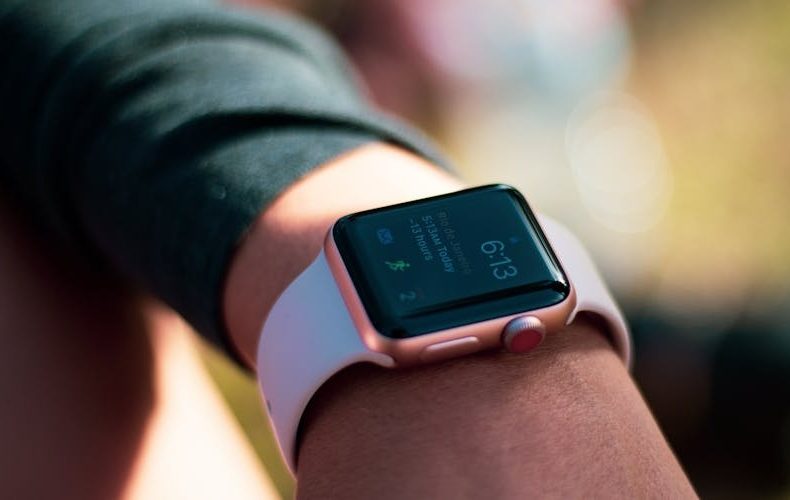
Apple dropped the Series 11 in September 2025, and I've been wearing one daily for about six months. Here's the thing nobody at Apple will say out loud: this might be the most incremental upgrade in the Apple Watch's entire history. Four changes. Better scratch resistance on the aluminum model, a Space Gray color option, improved battery life, and 5G connectivity. If you're coming from a Series 10, you're basically paying $399 for a tougher screen and a few extra hours of juice. But if you're rocking a Series 7 or older? Different story. This Apple Watch Series 11 review breaks down exactly where you fall, because the answer depends on what's already on your wrist.
I've tested smartwatches from Samsung, Google, and Apple over the past three years, and I keep coming back to the Apple Watch for one reason, it just works without fiddling. I spent real time with the Series 11 running watchOS 26, tested hypertension notifications, pushed the battery through heavy GPS workouts, and compared it side by side with my old Series 10. What follows is an honest breakdown, the good, the meh, and the stuff Apple's marketing glosses over.
What's Actually New in the Apple Watch Series 11
The changelog is short. Apple kept the same S10 chip inside, which says a lot about where they spent their budget this cycle. The aluminum models now use upgraded Ion X glass that's 2x more scratch resistant than the Series 10. After six months of daily wear, gym sessions, yard work, smacking it on door frames, my screen is pristine. My Series 10 aluminum had visible micro scratches within three months. The 5G connectivity uses RedCap technology, a low power flavor designed for wearables. It won't download movies faster, but it provides better coverage where LTE struggled. Battery jumps from 18 to 24 hours quoted. Real world? I get 20-22 hours with always on display and a 45 minute GPS workout.
Apple Watch Series 11 Review: Battery That Finally Lasts
Twenty four hours. Apple finally hit the number that should've been baseline three generations ago. Fast charging delivers 8 hours of tracking from just 15 minutes on the charger, I've tested this before early morning runs when I forgot to charge overnight. Reliable. Low Power Mode stretches to 38 hours, genuinely useful for overnight sleep tracking plus a full next day. The 5G radio doesn't drain noticeably more than LTE in my testing, though heavy standalone cellular use compresses things to 18-20 hours. Good enough. Not remarkable.
The optical heart sensor analyzes vascular response to each heartbeat over 30 day rolling windows. If it spots patterns consistent with chronic high blood pressure, you get a notification. Critical distinction: this isn't a blood pressure monitor. No 120/80 reading. It's a screening tool that flags potential hypertension so you visit a doctor. A colleague with diagnosed hypertension confirmed it flagged him within three weeks. FDA clearance covers the US and EU, over 150 countries total. Genuinely useful for the 40+ crowd who might not know they have a problem. But don't confuse it with actual measurement.
watchOS 26: The Software That Makes Upgrades Tricky
Here's the catch. Hypertension notifications and sleep score aren't Series 11 exclusives, they're watchOS 26 features rolling out to Series 9, Series 10, and Ultra 2. If you own any of those, you get the health upgrades free. Workout Buddy, the Apple Intelligence feature that gives spoken motivation based on your fitness history, sounds gimmicky but works better than expected. During a tempo run, it told me my pace was 15 seconds faster than my average and encouraged me to hold it. Specific and timely. The Liquid Glass interface redesign feels smoother, and the wrist flick gesture for dismissing notifications is one of those small things you use fifty times a day.
Apple Watch Series 11 Specs and Pricing Breakdown
Two sizes: 42mm and 46mm. Aluminum starts at $399 GPS only, $499 with 5G cellular. Titanium jumps to $699 with 5G included, available in Natural, Gold, and Slate. The titanium case is 3D printed from aerospace grade powder with sapphire crystal displays. Weight ranges 29.7g to 43.1g depending on size and material, titanium runs about six grams heavier. Display peaks at 2,000 nits, same as Series 10. Dimensions are 9.7mm thick across both sizes. The 42mm fits wrists 130-200mm, the 46mm fits 140-245mm. Go 46mm if your wrist allows it, the extra screen space makes a real difference for notifications and maps.
Series 11 vs Series 10: The Honest Verdict
If you own a Series 10, stay put. Seriously. The Series 10 is hitting all time low prices, and the only hardware differences are scratch resistance, Space Gray, six extra hours of battery, and 5G. Every headline software feature is coming to your watch through watchOS 26. You're paying $399 for a tougher screen. Not worth it. Coming from a Series 8 or older? Now we're talking. You gain the larger display from Series 10, dramatically better battery, crash detection, temperature sensing, sleep apnea alerts, and hypertension screening. The jump from Series 7 to 11 is massive. That's a worthwhile upgrade.
Do’s and Don’ts
Six months of daily wear taught me more than the spec sheet did. This table is the short version, what to do before and after buying the Series 11, and the traps that cost real money. Run through it before you click buy.
Do’s
Don’ts
Buy if upgrading from Series 8 or older for meaningful health feature gains
Don't upgrade from Series 10 . the differences don't justify $399
Get the 46mm if your wrist is above 160mm for better readability
Don't assume hypertension alerts replace a blood pressure cuff
Use fast charging . 15 minutes gives 8 hours of tracking
Don't buy 5G cellular unless you regularly leave your phone behind
Enable sleep tracking now that battery lasts through the night
Don't skip the hypertension setup if you're over 40
Consider titanium if you work with your hands or exercise outdoors
Don't pay full price . wait for $50-70 holiday discounts
Test Workout Buddy during your first week to calibrate it
Don't expect blood pressure readings . it only flags trends
Use Low Power Mode on travel days for 38-hour battery
Don't buy aluminum if you've scratched previous Apple Watches
Set up emergency SOS and satellite features before you need them
Don't ignore the Series 10 at its current discounted price
Check your carrier's 5G RedCap coverage before paying the premium
Don't assume the S10 chip feels slow . it handles everything fine
Pair with AirPods Pro 3 for the best wrist-only workout audio
Don't buy without confirming your iPhone supports watchOS 26 pairing
FAQs
Is the Apple Watch Series 11 worth upgrading from Series 10?
For most people, no. Both share the same S10 processor, display size, brightness, and core sensors. Hypertension notifications and sleep score are watchOS 26 updates coming to Series 9, 10, and Ultra 2. You're paying $399 for scratch resistance, six extra battery hours, and 5G. Unless you constantly scratch your aluminum watch, the math doesn't work.
How accurate are the hypertension notifications?
The feature has FDA clearance and analyzes optical sensor data over 30 day periods to detect chronic high blood pressure patterns. Users with diagnosed hypertension report it flagging them within two to three weeks. It's a screening tool, not a diagnostic, it tells you to see a doctor, not what your numbers are.
What's the real battery life?
Apple says 24 hours. With always on display, notifications, and a 45 minute GPS workout, I get 20-22 hours consistently. Heavy 5G cellular use drops that to 18-20. Low Power Mode genuinely hits 38 hours. Fast charging gives 8 hours from 15 minutes on the charger.
Should I get aluminum or titanium?
Aluminum starts at $399/$499. Titanium is $699 with 5G included plus sapphire crystal display. If you've scratched previous aluminum models, titanium solves that permanently. The six gram weight difference is barely noticeable. For outdoor athletes or anyone rough on watches, the premium is justified.
Does the Apple Watch Series 11 measure blood pressure?
No. It monitors vascular patterns over 30 day windows and alerts you if those patterns suggest chronic hypertension. No systolic/diastolic numbers. Think of it as a flag that says "go see your doctor," not a replacement for a cuff.
Is 5G on the Apple Watch actually useful?
Only if you use cellular without your phone nearby. RedCap 5G provides better coverage where LTE was spotty, runners and hikers notice the difference. If your phone's always nearby, you won't notice. Check your carrier's coverage map before paying the $100 aluminum cellular premium.
We use cookies to see which reviews and buying guides readers find useful, so we can keep improving them. Accept analytics cookies, or carry on with essential ones only. See our Cookie Policy.











 Get it on
  Download on the