Smart plugs are the cheapest way to make any home smarter. No hub, no rewiring, no electrician. Plug one into a wall outlet, connect it to your phone, and suddenly that old box fan or floor lamp obeys voice commands and schedules. I started with two Kasa plugs three years ago to automate my coffee maker and a hallway lamp. Now I've got eleven scattered around the house, controlling everything from a window AC unit to a salt lamp I keep forgetting to turn off. The best smart plugs 2026 brings to the table are cheaper, more reliable, and finally speak a universal language thanks to Matter. If you've been on the fence, the excuses have run out.
The market is flooded though. Amazon lists over 400 smart plugs, most looking identical. Some support Matter, some don't. Some track energy usage down to the watt, others just toggle power. I've spent weeks testing plugs from Kasa, Eve, Tapo, Meross, and Wyze across Apple HomeKit, Google Home, and Alexa. This guide covers the best smart plugs 2026 has available, organized by reliability, features, price, and future proofing.
Why Matter Support Changes Everything for Best Smart Plugs 2026
If a smart plug doesn't have the Matter logo on the box, put it back. Matter is the universal protocol that lets a TP Link plug talk to an Apple HomePod, Samsung SmartThings hub, or Google Nest speaker without proprietary bridges. Before Matter, buying a plug meant committing to one ecosystem forever. Thread based Matter plugs go further, they create a mesh network that strengthens with every device you add. I tested an Eve Energy plug 45 feet from my nearest Thread border router and it responded in under 200 milliseconds every time. My old Wi Fi plugs dropped connection twice weekly in the same spot. That gap alone justifies Matter.
Best Overall: Kasa EP25 (4 Pack, $29)
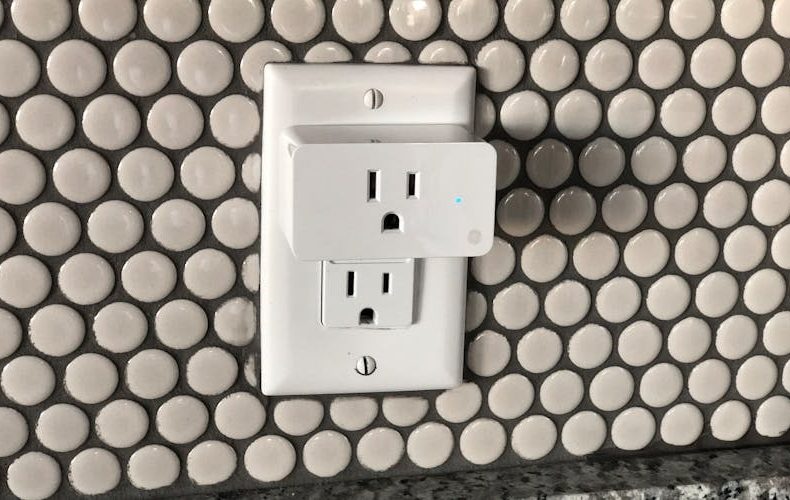
Four plugs for $29, $7.25 each, with energy monitoring, HomeKit support, and a slim profile that lets you stack two in a standard duplex outlet. Perfect. I've had a set running 14 months with essentially flawless schedule reliability. The Kasa app tracks real time wattage and monthly consumption, which is how I discovered my dehumidifier was pulling 680 watts, roughly $14 a month just sitting in the basement. Setup takes 90 seconds over 2.4 GHz Wi Fi. The 15A, 1800W rating handles most household appliances. If you only buy one product from this list, make it these.
Best Premium: Eve Energy ($35-40 per Plug)
The Eve Energy runs entirely on Thread, no cloud account, no data leaving your home. Every plug doubles as a Thread router node, strengthening your mesh. I added three upstairs and two previously flaky sensors started responding instantly. Energy monitoring tracks watts, volts, and kilowatt hours with historical charts. At $35-40 per unit, you're paying five times the Kasa's price. But for a privacy focused, Thread native device that works with HomePod, Apple TV 4K, SmartThings Hub v3, and Echo 4th gen, it justifies the premium. Overkill for a desk lamp though.
Best Budget: Tapo P125M (3 Pack, $19)
Six bucks per plug with Matter certification. I double checked the listing twice. The catch? No energy monitoring, you get on/off control, scheduling, and cross platform compatibility. That's it. For automating lamps, fans, or holiday lights, that's genuinely all you need. The 15A rating handles 1800W, and the compact design fits two side by side in a standard outlet. I ran three of these for two weeks, toggling via Google Home about 200 times. Zero failures. The plastic feels lightweight but functional. Doesn't matter at this price, outfit every room for under $40.
Best for Energy Monitoring on a Budget: Meross MSS315 ($18)
The Meross MSS315 bridges the gap between cheap and feature rich at $18. Wi Fi Matter plug with real time power tracking, watts, voltage, current, and 30 day historical data. I used one to audit my desk setup: monitor, laptop dock, and lamp together pull 165 watts, roughly $8 monthly at $0.16/kWh. The app lets you set consumption alerts for catching devices drawing more than expected. Pairs via Matter in 30 seconds, works across every major platform. Slightly bulkier than the Kasa EP25, but stacking two is doable.
How Smart Plugs Actually Save You Money
A smart plug doesn't magically cut your bill by existing. The savings come from killing phantom loads, scheduling high draw appliances off peak, and finding energy hogs you didn't know about. I tracked my entertainment center's idle draw: 28 watts on standby. $3.50 a month doing nothing. Cut power overnight and I'm saving $25 annually on one outlet. A friend discovered her mini fridge was costing $15 a month, replaced it and saved $180 a year. The DOE estimates phantom loads cost the average U.S. household $30-50 annually. These plugs pay for themselves fast.
What to Check Before You Buy the Best Smart Plugs 2026
Verify the amp rating, 15A (1800W) covers lamps, fans, coffee makers, and small heaters. Don't exceed it. Just scheduling lights? Skip monitoring, grab the Tapo P125M. Want to track bills? Get the Kasa EP25 or Meross MSS315. Check physical size, some plugs block the second outlet. Kasa EP25 and Tapo P125M are slim enough to avoid this. Thread plugs need a border router (HomePod mini, Apple TV 4K). Wi Fi plugs need 2.4 GHz. And always check for UL certification. Cheap plugs without UL listings are a genuine fire risk. Every plug on this list is certified.
Do’s and Don’ts
Eleven plugs and three years of automation later, these are the habits that separate a tidy setup from a junk drawer of forgotten gadgets. The quick reference table below covers the buying checks and setup moves that matter most in 2026. Glance through it before you add anything to your cart.
Do’s
Don’ts
Buy Matter-certified plugs for cross-platform future-proofing
Don't buy plugs without Matter in 2026. you'll regret it
Check physical size so it won't block your second outlet
Don't assume all "mini" plugs fit side-by-side without checking
Use energy monitoring to find phantom loads costing you money
Don't ignore usage data. tracking without action wastes the feature
Start with a budget pack like Kasa EP25 to test before going all-in
Don't spend $40/plug on Eve Energy just to schedule a lamp
Confirm your router supports 2.4 GHz for Wi-Fi plugs
Don't buy Thread plugs without a border router like HomePod or Apple TV
Set overnight schedules to kill entertainment center standby draw
Don't leave TVs and consoles pulling phantom power 24/7
Check UL certification before buying any plug
Don't buy unbranded plugs from unknown sellers without safety certs
Use outdoor-rated plugs like Wyze Outdoor v2 for patios
Don't use indoor plugs outside, even under a covered porch
Name plugs descriptively. "Office Lamp" not "Plug 1"
Don't skip firmware updates. older versions have real vulnerabilities
Group plugs by room in your app for easier voice control
Don't mix Thread and Wi-Fi plugs without understanding the tradeoffs
FAQs
Do smart plugs use a lot of electricity themselves?
Almost nothing. Most draw 0.5 to 1 watt on standby, roughly $0.50 to $1.00 per year at U.S. rates. Thread plugs use even less. You'd need over 100 running before their draw showed up on your bill. The energy they save by killing phantom loads offsets consumption within the first month.
What's the difference between Matter over Wi Fi and Matter over Thread?
Both use Matter for cross platform compatibility, but the network differs. Wi Fi plugs connect to your router, no extra hardware. Thread plugs use a low power mesh requiring a border router (Apple TV 4K, HomePod mini, SmartThings Station). Thread responds faster and each device strengthens the mesh. Have a border router? Go Thread. Don't? Wi Fi Matter works fine.
Can smart plugs handle space heaters?
Yes, with caveats. Every plug here is rated 15A / 1800W, covering heaters up to 1500W. Never exceed the rating, fire hazard. Plug directly into a wall outlet, never a power strip. For appliances above 1800W, you need a heavy duty 20A plug.
Do I need a hub to use smart plugs?
Not in 2026. Wi Fi plugs like Kasa EP25 and Tapo P125M need just your router. Thread plugs need a border router, but if you own an Apple TV 4K or HomePod mini, you're covered. Dedicated Zigbee hubs for toggling lamps are history.
Which smart plug is best for renters?
Tapo P125M 3 pack at $19. Cheap enough to leave behind, Matter compatible, zero permanent installation. Want energy monitoring? Step up to the Kasa EP25 4 pack at $29. Both are hub free and work with every major voice assistant.
How many smart plugs can my Wi Fi handle?
Most routers support 20-30 without issues, each plug sends tiny data packets, not video. Running more? Switch some to Thread, which operates on its own mesh. I run 11 Wi Fi plugs and 3 Thread plugs on a standard Eero with zero problems.
We use cookies to see which reviews and buying guides readers find useful, so we can keep improving them. Accept analytics cookies, or carry on with essential ones only. See our Cookie Policy.












 Get it on
  Download on the