So you've narrowed it down to Ring and Nest, and now you're stuck. Fair enough, these two dominate smart home security and both look great on paper. But here's the thing about Ring vs Nest smart home security: they're built for fundamentally different households. Ring is Amazon's ecosystem, Nest is Google's, and that loyalty shapes everything from which voice assistant arms your system to how much you'll pay for cloud storage. I've been running Ring at my front door and a Nest Cam in my backyard for over a year, and the daily experience gap is wider than spec sheets suggest. Picking wrong doesn't just waste $200, it means fighting your own smart home every night.
Most comparison articles skip the biggest difference: Ring sells a complete security system with professional monitoring, sensors, keypads, and a built in Wi Fi 6 router. Nest? Google killed Nest Secure in April 2024 and never replaced it. Want door sensors, a keypad, and 24/7 monitoring from Google's ecosystem? Out of luck, you'll need Nest cameras paired with a separate ADT setup. That single fact reshapes everything. I'm covering cameras, doorbells, subscriptions, and three year costs so you can stop overthinking and order something.
Ring Alarm Pro: The Only Complete Ring vs Nest Smart Home Security System
Ring's biggest advantage is straightforward, they sell an actual alarm system. The Alarm Pro 8 piece kit runs $299.99: base station (doubling as an eero Wi Fi 6 router covering 1,500 sq ft), keypad, four contact sensors, motion detector, range extender. The 14 piece kit bumps to $499.99. That eero integration is clever, your security hub is also your network backbone, and if internet drops, the base station has 3GB of cellular backup with Ring Protect Pro. I tested failover during an outage last winter. Cameras stayed online about 45 minutes on cellular. Not infinite, but enough for most outages.
Camera Lineups: Ring's Breadth vs Nest's Intelligence
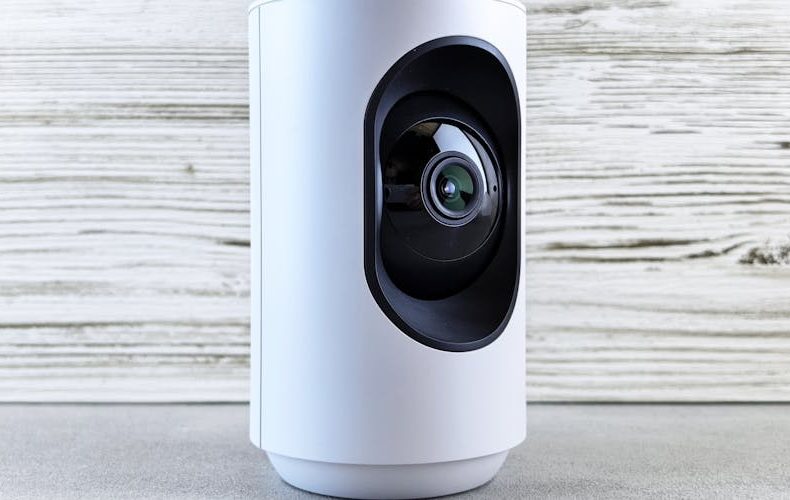
Ring offers four camera lines: Indoor Cam ($59.99), Stick Up Cam, Spotlight Cam ($149.99), and Floodlight Cam ($199.99, $249.99). The Floodlight pumps 2,000 lumens per light, over five times the Spotlight's 375 lumens. Real difference on a dark driveway. Nest keeps it simpler with the Nest Cam Battery at $179.99 for indoor/outdoor, a wired indoor model, and the Nest Cam with Floodlight. Fewer choices, but every Nest Cam ships with on device AI detecting people, vehicles, animals, and packages on the free tier. No subscription needed. Ring's basic motion detection feels primitive next to that, you'll need Protect Pro at $20/month for comparable intelligence.
Ring vs Nest Smart Home Security: Doorbells Compared
Ring dominates doorbells with eight models. The Battery Doorbell Plus captures 1536p Head to Toe video, you can actually see packages on the porch without the frame cutting off at knee height. Battery lasts 3 6 months. Nest offers one doorbell in battery and wired configs. Resolution sits at 960×1280, noticeably softer. But Nest handles HDR better when a visitor's face is shadowed against bright background. It also recognizes familiar faces with Google Home Premium, alerting "Sarah is at the door" instead of generic motion alerts. Ring for image quality. Nest if you want to know who without checking.
Subscription Plans: Where the Real Cost Hides
Ring's 2026 tiers: Solo ($4.99/month, one device), Multi ($9.99/month, all devices), Pro ($20/month or $200/year, adds professional monitoring plus cellular backup). Without a plan, Ring cameras only livestream, no recording, no playback. Nothing. Google rebranded Nest Aware as Google Home Premium. Standard is $10/month with 30 days of event history. Advanced runs $20/month with 60 days plus continuous recording. The kicker: Nest gives 3 hours of free event history with zero subscription. Ring gives you nothing free. For a single camera, Nest's free tier is genuinely useful.
Ecosystem Lock In: Alexa vs Google Home
Ring streams live to any Echo Show: "Alexa, show me the front door." Arm Ring Alarm through Alexa, build routines triggering lights on motion, get spoken alerts through every Echo. Nest cameras do the same on Google Nest Hub displays. The problem?
Ring streams live to any Echo Show, "Alexa, show me the front door." Arm Ring Alarm through Alexa, build routines triggering lights on motion, get spoken alerts through every Echo. Seamless. Nest cameras do the same on Google Nest Hub displays. The problem? Cross ecosystem support barely exists. Ring won't stream to Nest Hubs. Nest Cams won't appear on Echo Shows. A friend tried forcing Ring into a Google household and gave up within a month. Pick the ecosystem you already own. Switching later means replacing hardware.
Three Year Cost Breakdown: The Numbers That Actually Matter
A Ring setup, Alarm Pro 8 piece ($299.99), Battery Doorbell Plus ($179.99), two Spotlight Cams ($299.98), Protect Pro at $20/month, totals roughly $1,500 over three years. Comparable Nest setup, two Nest Cam Batteries ($359.98), Nest Doorbell ($179.99), Home Premium Advanced at $20/month, plus ADT Self Setup ($200 hardware, $20/month), lands around $2,180. That $680 gap matters. Ring runs through one app and one base station. Nest's camera AI is smarter, but you're paying more for a fragmented two app experience.
Do’s and Don’ts
Both systems reward buyers who plan ahead and punish the ones who guess. The table below sums up the habits that saved me money and headaches across a year of running both platforms. Give the don'ts column a hard look before you commit to either ecosystem.
Do’s
Don’ts
Pick the ecosystem matching your existing smart speakers and displays
Don't buy Ring if your house runs Google Home. you'll fight the integration daily
Start with a doorbell camera to test the app before expanding
Don't assume Nest offers a full alarm system. Google killed Nest Secure in 2024
Factor in 3-year subscription costs, not just hardware prices
Don't skip a Ring subscription. cameras become expensive paperweights without one
Use Ring Alarm Pro's built-in eero router to simplify your network
Don't ignore cellular backup. Ring's 3GB failover justifies the Pro plan alone
Take advantage of Nest's free 3-hour event history for a single camera
Check if your Google AI Pro subscription already includes Home Premium
Don't buy the cheapest Ring doorbell expecting Head-to-Toe video. that's the Plus
Test motion zones immediately after installation to cut false alerts
Don't mount battery cameras in high-traffic spots. you'll recharge every 3 weeks
Buy Ring cameras during Prime Day for 30-40% discounts
Don't forget Nest facial recognition requires a Google Home Premium subscription
Use Ring Neighbors app for local crime alerts and shared footage
Don't rely solely on cameras. add contact sensors on entry points
Consider Ring's solar panel accessories to eliminate charging entirely
Don't overlook ADT if you want Nest cameras with professional monitoring
FAQs
Is Ring or Nest better for home security in 2026?
Ring wins for comprehensive security because it offers a complete alarm system with 24/7 professional monitoring, something Nest lost when Google killed Nest Secure in 2024. Ring Alarm Pro includes sensors, a keypad, and emergency dispatch for $20/month. Nest excels at smart camera AI for detecting people, packages, and vehicles. But cameras alone aren't a security system. If you want sensors on every entry point plus emergency dispatch, Ring wins clearly.
How much does Ring cost per month in 2026?
Ring offers four tiers: Solo at $4.99/month for one device, Multi at $9.99/month for all devices, and Pro at $20/month ($200/year) with professional monitoring and cellular backup. Without any subscription, cameras only livestream, no recording or playback. Pro at $200/year undercuts traditional systems like ADT or Vivint, which charge $40, $60/month.
Is Google Home Premium worth it for Nest cameras?
With zero subscription, every Nest Cam gets 3 hours of free event history plus smart alerts for people, animals, and vehicles. Usable for one camera. Standard ($10/month) extends history to 30 days and adds face recognition. Advanced ($20/month) gives 60 days of events plus continuous recording. If you already pay for Google AI Pro or Ultra, Home Premium is included free, obvious yes.
Can I use Ring cameras with Google Home?
Not meaningfully. Ring cameras won't stream to Nest Hub displays, and Ring Alarm doesn't work with Google Home routines. IFTTT workarounds exist but add latency and break often. If your home runs Google Assistant, buy Nest cameras. Forcing Ring into a Google household creates constant friction.
Which has better night vision, Ring or Nest?
Ring edges ahead with color night vision, the Spotlight Cam (375 lumens) and Floodlight Cam (2,000 lumens) illuminate the scene with visible light. The Floodlight turns night into day. Nest Cam Battery uses infrared, producing decent but black and white footage. For full color video after dark, Ring's built in illumination is a hardware advantage software can't replicate.
Can I install Ring or Nest cameras myself?
Both are designed for DIY setup. Ring includes mounting brackets and app guided installation. Nest Cam Battery uses a magnetic mount, under 10 minutes per camera. Hardwired models like the Ring Floodlight Cam need existing electrical wiring, so hire an electrician if you're uncomfortable with 120V. Everything battery powered is simple enough that my non technical parents handled their Ring doorbell alone. Perfect.
We use cookies to see which reviews and buying guides readers find useful, so we can keep improving them. Accept analytics cookies, or carry on with essential ones only. See our Cookie Policy.














 Get it on
  Download on the